Will it fit in 24 GB?
The question comes up, and the usual answer is 'it depends'. Here's a table with model names, a formula, and the factors that change the answer most often.
By
Published on
The question comes up, and the usual answer is "it depends". That answer is technically correct, because the verdict really does move with context length, batch size and quantisation method. It also leaves you no closer to knowing whether to provision a card.
So below is a table with model names, a formula for the models it doesn't cover, and the two factors that change the answer most often. Corrections are welcome, and we'll keep the table updated.
The formula
Start with the formula, because it travels further than any list:
VRAM (GB) ≈ parameters (B) × bits ÷ 8 × 1.2, plus KV cache.
The ×1.2 covers activations and framework overhead. The KV cache gets its own section below, because it is where most sizing estimates go wrong. Everything here is approximate, and assumes single-GPU inference.
The table
| Model | Precision · weights | On 24 GB? |
|---|---|---|
| Whisper large-v3 | FP16 · ~3 GB | Yes, comfortably. The transcription workhorse barely registers. |
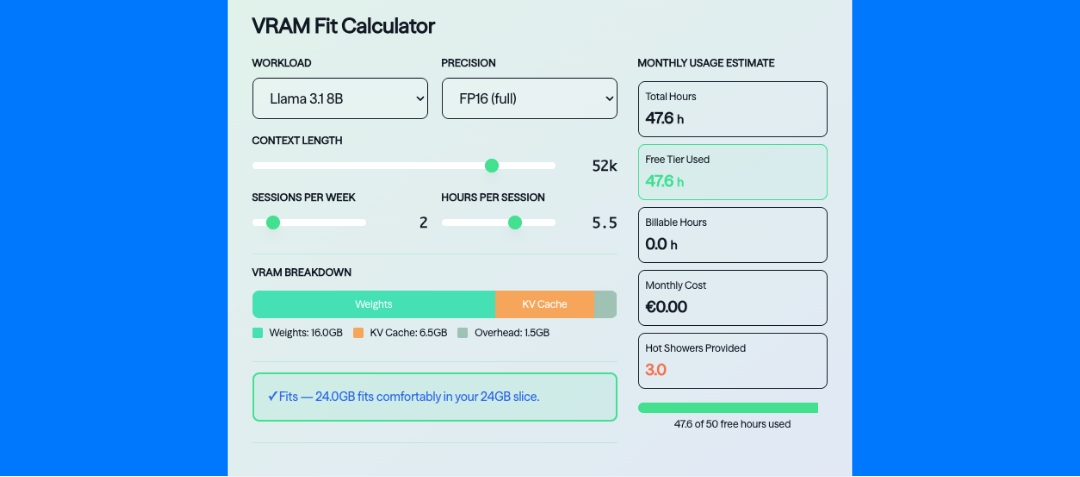
| Llama 3.1 8B | FP16 · ~16 GB | Yes, though long context will bite first. Weights plus overhead leave roughly 5 GB for KV cache. |
| Llama 3.1 8B | 4-bit · ~5 GB | Yes, with headroom for serious context or batching. |
| Mistral Nemo 12B | 4-bit · ~7 GB | Yes, comfortably. |
| Qwen2.5 14B | 4-bit · ~9 GB | Yes. |
| Gemma 2 27B | 4-bit · ~16 GB | Yes, but watch your context length. |
| Qwen2.5 32B | 4-bit · ~18–19 GB | Tight. Short context, and no room for batching. |
| SDXL (image) | FP16 · ~7 GB | Yes. |
| FLUX.1 dev (image) | FP16 ~24 GB / FP8 ~12 GB | Conditional. Not at FP16. Yes at FP8 with the text encoder quantised or offloaded, which is how most people run it anyway. |
| Mixtral 8×7B | 4-bit · ~25 GB | No, and this row catches people out. |
| Llama 3.3 70B | 4-bit · ~40 GB | No. This is a case for a bigger card rather than more of them, since it fits on a single 96 GB GPU with room for real context. |
Calculate your own case
For a specific model, context length, batch size and quantisation, the calculator below runs the actual sums. It is free, and there is no account needed.
VRAM Fit Calculator
VRAM Breakdown
Monthly Usage Estimate
Mixtral 8×7B
Mixtral 8×7B activates around 13B parameters per token, so it reads like a small model on paper. VRAM does not care what is active, though. All eight experts have to be resident in memory, so the full weight footprint applies. Mixture of experts buys compute efficiency, not memory efficiency. In total the model is closer to 47B.
Context length
A Llama 3 8B class KV cache at FP16 sits at roughly 0.5 GB at 4k context, and around 16 GB at 128k. The same model at the same quantisation can therefore fit at 4k and run out of memory at long context, which is why a single yes or no is rarely enough.
Those figures already assume grouped query attention, which Llama 3 has built in, and KV cache quantisation brings them down further. Models without GQA are considerably worse, in the region of 4× at every context length. That is the sort of variable a static table cannot decide for you.
Quantisation
Quantisation quality varies by model and by method, so "fits" is not the same as "performs identically". Serving frameworks differ in their overhead. Fine-tuning is a separate memory budget, even with parameter-efficient methods. And the table itself is a set of approximations that will drift as new quants land, so if you find a row that is wrong in practice, tell us and we will update it.
Interested?
We have just opened the waitlist for our free GPU tier, which gives you a dedicated 24 GB slice of an RTX 6000 and 50 GPU-hours a month. That is enough to test against your own model and your own context length, rather than against a table.
Those slices run on Leafcloud infrastructure, which means the servers sit inside buildings that need hot water. The heat your inference run produces goes into showers instead of a cooling tower, hosted in the EU, on an open-source stack.
Join the waitlist, or if you would rather talk through sizing before you commit to anything, book a call with our team.