FAQ
Questions & Anwers
Answers to common questions regarding your account, servers, billing, etc.
How does dynamic pricing work?
Our dynamic pricing model adjusts GPU compute costs in real-time based on market demand and availability, ensuring you always get the best possible rates. Prices fluctuate throughout the day, allowing you to optimize costs by scheduling workloads during lower-demand periods.
How does the forecast work?
The forecast shows GPU pricing based on day-ahead electricity market data from the Dutch grid (ENTSO-E), sourced via euenergy.live. Tomorrow's electricity prices publish daily around 13:00 CET. The dashboard provides up to 48 hours of pricing data depending on the time of day: most complete from 13:00-23:59 CET when both today's remaining hours and tomorrow's full forecast are available. In the morning before 13:00, tomorrow's prices are estimated based on historical patterns until official publication.
What do the forecast confidence levels mean?
The confidence badge indicates the data quality and timing of the cheapest window. LIVE · HIGH CONFIDENCE (green) means the window is happening now or uses real published day-ahead electricity prices from ENTSO-E. FORECASTED · MEDIUM CONFIDENCE (blue) means the window is 12-24 hours ahead with real data. FORECASTED · ESTIMATED DATA (orange) appears when tomorrow's electricity prices haven't been published yet (they publish daily around 13:00 CET) or when using historical patterns to estimate prices. The dashboard shows up to 48 hours of pricing depending on time of day.
Why dynamic pricing?
Dynamic pricing lets you access premium GPU compute at significantly reduced costs during off-peak hours, making high-performance computing more affordable and accessible. Learn more about dynamic pricing
What makes Leafcloud sovereign?
Leafcloud is a European cloud provider subject to EU data protection laws, ensuring your data stays within EU jurisdiction and is never subject to foreign surveillance laws. Learn more about digital sovereignty
What security certifications does Leafcloud have?
Leafcloud holds ISO 27001 and SOC2 Type II certifications, ensuring enterprise-grade security and compliance with international information security standards. All data stays in the Netherlands (GDPR compliant, no US CLOUD Act exposure). Learn more about our security
How sustainable is Leafcloud?
Leafcloud operates with 100% renewable energy and repurposes waste heat from our data centers to warm local buildings, making us one of the most sustainable cloud providers in Europe. Learn more about our sustainability
A30 vs A100: Which GPU for inference workloads?
Choose A30 for cost-effective inference of small-to-medium models, or A100 for high-throughput inference of large models. Here's how they compare for inference:
A30 (24GB HBM2) - Inference Optimized:
- Memory: 24GB HBM2 - sufficient for models up to ~30B parameters with quantization
- Power: 165W TDP - lowest power consumption for efficient inference
- Cost: €0.60/hour - 3.6x cheaper than A100
- INT8 performance: Excellent for quantized inference workloads
- Availability: 1x, 2x, 4x, 8x configurations for scaling
A100 (80GB HBM2e) - High-Performance Inference:
- Memory: 80GB HBM2e - supports models up to ~175B parameters with quantization
- Power: 300W TDP - higher throughput per GPU
- Cost: €1.61/hour - premium performance
- FP16/BF16 performance: Faster for half-precision inference
- Availability: 1x, 2x, 4x, 8x configurations for large-scale serving
Performance Comparison for Common Models:
Small models (7B parameters, e.g., Llama 2 7B, Mistral 7B):
- A30: 40-60 tokens/second with INT8 quantization - excellent cost efficiency
- A100: 80-120 tokens/second with FP16 - faster but overkill for this size
- Recommendation: A30 (2.5x lower cost with sufficient performance)
Medium models (13-30B parameters, e.g., Llama 2 13B):
- A30: 20-35 tokens/second with INT8/INT4 quantization
- A100: 50-80 tokens/second with FP16 or INT8
- Recommendation: A30 for cost-sensitive deployments, A100 for low-latency requirements
Large models (70B parameters, e.g., Llama 2 70B):
- A30: Requires 4x GPUs with aggressive quantization (INT4) - challenging
- A100: 1-2 GPUs with INT8 quantization - practical
- Recommendation: A100 (simpler deployment, better performance)
Very large models (175B+ parameters, e.g., GPT-3 scale):
- A30: Not recommended - insufficient memory per GPU
- A100: 2-4 GPUs with INT8 quantization
- Recommendation: A100 only option
When to choose A30:
- Cost optimization: Inference-only workloads with budget constraints
- Small-to-medium models: 7B-30B parameter models with quantization
- Batch inference: High-throughput, lower-latency-tolerance workloads (e.g., content generation, summarization)
- Production inference: Deploy multiple A30 GPUs for horizontal scaling (€0.60/hour each)
- Energy efficiency: 165W TDP minimizes power costs for sustained inference
When to choose A100:
- Large models: 70B+ parameter models requiring high memory capacity
- Low-latency inference: Real-time chatbots, code assistants requiring sub-second response
- Mixed workloads: Fine-tuning + inference on the same infrastructure
- Future-proofing: Support larger models as your product scales
- Premium services: High-performance inference for paying customers
Cost-performance analysis (Llama 2 13B inference):
- A30: ~30 tokens/second @ €0.60/hour = 50 tokens/second per €1/hour
- A100: ~70 tokens/second @ €1.61/hour = 43 tokens/second per €1/hour
- Result: A30 provides significantly better cost efficiency, while A100 offers lower latency per request
Scaling strategy:
- Horizontal scaling with A30: Deploy 4x A30 for distributed inference across multiple models or users
- Vertical scaling with A100: Deploy 1x A100 (€1.61/hour) for single large model with high throughput
For most inference workloads serving models under 30B parameters, A30 provides the best cost efficiency. Choose A100 when you need to serve large models (70B+) or require maximum throughput per GPU.
Are all listed prices for Leafcloud services excluding VAT?
Yes, all prices listed on our website exclude VAT. For VAT-included pricing, please contact us directly at info@leaf.cloud.
Are containerized workloads easier to migrate to OpenStack?
Yes. Containerized applications on Kubernetes are inherently portable, making cloud migrations dramatically faster. If your workloads run on EKS, AKS, or GKE, migrating to Leafcloud's OpenStack infrastructure is primarily a configuration change, not a code rewrite.
Why containerization accelerates migration:
Kubernetes provides a consistent abstraction layer across all cloud providers. Your application manifests, Helm charts, and Kubernetes operators work identically whether running on AWS EKS, Azure AKS, Google GKE, or Leafcloud's Gardener managed Kubernetes.
Migration timeline for containerized workloads:
- Kubernetes to Kubernetes: 1-4 weeks for most applications (EKS → Gardener)
- Container images: No changes required—pull from same registries (Docker Hub, ECR, GCR, private registries)
- Persistent storage: Kubernetes CSI drivers handle Cinder block storage transparently
- Load balancing: Service type LoadBalancer provisions Octavia load balancers automatically
- GPU workloads: NVIDIA GPUs (H100, A100, A30, RTX 6000) available as Kubernetes node resources
What stays the same:
- Application code: Zero changes to containerized applications
- Deployment manifests: kubectl apply, Helm charts, and Kustomize work identically
- CI/CD pipelines: Update kubeconfig context—workflows remain unchanged
- Monitoring: Prometheus, Grafana, and cloud-native observability tools work identically
- Service mesh: Istio, Linkerd, and Cilium function the same on OpenStack infrastructure
Examples of fast migrations:
- ML/AI workloads: Containerized models on EKS migrate to Gardener with GPU support (H100, A100) in 2-4 weeks
- Microservices: API services with stateless containers migrate in 1-2 weeks
- Data pipelines: Argo Workflows, Apache Airflow, and Spark on Kubernetes move without refactoring
When migration takes longer:
Even with containerization, some dependencies may extend timelines:
- Managed services: Using AWS-specific services (RDS, ElastiCache, SQS) alongside Kubernetes requires replacing with self-managed or open-source alternatives
- Persistent data: Large databases or stateful workloads need careful migration planning for data transfer
- Custom integrations: Applications tightly coupled to hyperscaler APIs need refactoring
Not containerized yet?
If your workloads run directly on EC2, Azure VMs, or GCP Compute Engine, consider containerizing before migrating. You'll gain:
- Faster migration: Kubernetes-to-Kubernetes is weeks instead of months
- Future portability: Move between any OpenStack provider or back to hyperscalers without lock-in
- Modern orchestration: Auto-scaling, rolling updates, and declarative infrastructure
- Cost efficiency: Better resource utilization with container density
Leafcloud provides Gardener managed Kubernetes with full GPU support, integrated with OpenStack infrastructure (Nova VMs, Cinder storage, Neutron networking, Octavia load balancers). Your containerized workloads migrate quickly while gaining EU sovereignty and eliminating egress fees.
Are there discounts available for long-term GPU commitments?
Yes, discounts are available for commitments of a month or longer. Visit our pricing page or contact us at hello@leaf.cloud for details.
Can other cloud providers replicate Leafcloud's heat reuse model?
Technically yes, but it requires fundamental infrastructure changes. Heat reuse requires:
- Existing urban buildings with heating needs (not remote mega-datacenters)
- Distributed architecture (servers close to heat consumers)
- Proximity to heat demand (heat transport is expensive and wasteful)
Hyperscalers (AWS, Azure, Google Cloud) build remote mega-datacenters to optimize for land cost and power availability, making heat transport to consumers economically unviable. Meta and Microsoft have experimented with district heating partnerships, but these require extensive piping infrastructure.
Leafcloud's model works because we build small, distributed deployments inside buildings that already need heat—no heat transport required.
Can I belong to multiple organizations?
You can be a team member of multiple teams across several organizations. However, you cannot be an Admin of multiple organizations
Can I belong to multiple projects?
Yes, through your teams, you can be assigned to multiple projects
Can I belong to multiple teams?
Yes, you can belong to multiple teams, even across different organizations.
Can I extend the disk space of an instance that is already running?
Yes, you can extend the disk space of an instance that is already running. The safest and most flexible way to do this requires multiple volumes and a bit of planning. You can find step-by-step guides in our documentation here
Can I get application-level support?
Leafcloud does not offer direct application-level support. Options for application-level support are available through our partner network.
Can I migrate existing GPU workloads from AWS, Azure, or GCP to Leafcloud?
Yes. Leafcloud uses standard OpenStack APIs and supports common orchestration tools like Kubernetes, and IaC solutions like Terraform and Ansible making migration straightforward.
Can I migrate workloads from AWS to Leafcloud?
Yes. Leafcloud, which runs on OpenStack, provides similar IaaS capabilities to AWS, and many workloads can migrate with reasonable effort. The complexity depends on your AWS service usage.
Easy to migrate (OpenStack equivalents):
- EC2 → Nova: Virtual machines with similar instance types and APIs
- EBS → Cinder: Block storage volumes with snapshots
- VPC/Security Groups → Neutron: Software-defined networking with security groups
- S3 → Swift: Object storage with S3-compatible API
- ELB/ALB → Octavia: Load balancing with similar capabilities
- Route53 → Designate: DNS management
- EKS → Gardener/Magnum: Managed Kubernetes on OpenStack
Moderate effort (requires refactoring):
- Lambda → Kubernetes Jobs: Replace serverless functions with containerized jobs
- RDS → Self-managed databases: Deploy PostgreSQL/MySQL/MongoDB on Nova instances or managed DBaaS
- SQS/SNS → RabbitMQ/Kafka: Message queuing with open-source alternatives
- CloudWatch → Prometheus/Grafana: Monitoring with open-source observability stack
Open-source alternatives (escape vendor lock-in):
- SageMaker → Kubeflow: 2-4 weeks for containerized ML workloads on GPU infrastructure (H100, A100, A30)
- DynamoDB → Cassandra/MongoDB: 2-6 weeks depending on data model complexity
- API Gateway → Kong/Traefik: 1-2 weeks with Kubernetes-native ingress controllers
- Step Functions → Argo Workflows: 1-3 weeks depending on workflow complexity
Migration strategy:
- Audit AWS usage: Identify which services you actually use (EC2, S3, RDS vs. proprietary services)
- Lift-and-shift compatible workloads: Start with EC2 instances that can move directly to Nova
- Refactor database tier: Migrate RDS to self-managed or OpenStack DBaaS offerings
- Replace proprietary services: Containerize Lambda functions, migrate to open-source alternatives
- Update Infrastructure-as-Code: Convert AWS Terraform/CloudFormation to OpenStack Terraform provider
- Test thoroughly: Run parallel environments during migration window
What makes migration easier:
- Containerized workloads: Kubernetes-based apps migrate seamlessly (EKS → Gardener)
- Standard APIs: Apps using PostgreSQL, Redis, Kafka, S3-compatible storage have direct equivalents
- Minimal managed services: Less dependency on AWS Lambda, SageMaker, DynamoDB means easier migration
OpenStack benefits after migration:
- No egress fees (save $0.12/GB on outbound traffic)
- Transparent pricing (no surprise charges)
- EU sovereignty (Leafcloud in Amsterdam, not subject to US CLOUD Act)
- Vendor independence (switch providers without lock-in)
Leafcloud provides OpenStack infrastructure with GPU support (H100, A100, A30, RTX 6000 Blackwell), managed Kubernetes (Gardener), and S3-compatible object storage to support AWS workload migrations.
Can I migrate VMs from AWS, Azure, or GCP to Leafcloud?
Yes, migrating from hyperscaler VMs to Leafcloud is straightforward thanks to OpenStack's standard APIs and broad tooling support. Most migrations can be completed with minimal downtime using standard Linux tools or OpenStack utilities.
Migration Methods:
For cloud-to-cloud migrations, you have several options:
- Image import: OpenStack provides native import tools that work with common VM formats (QCOW2, RAW, VMDK)
- Export and import: Export your existing VM image from AWS EC2, Azure VMs, or GCP Compute Engine, then import it directly to Leafcloud using the OpenStack CLI or Horizon dashboard
- Live migration: For running workloads, tools like
rsyncor block-level replication minimize downtime during cutover
VM Compatibility:
Leafcloud runs industry-standard x86-64 processors (AMD EPYC 9755 128-Core Processor). Any Linux distribution or Windows Server version that runs on AWS, Azure, or GCP will run on Leafcloud without modification.
Supported operating systems:
- Ubuntu, Debian, CentOS, Rocky Linux, AlmaLinux
- Windows Server 2016-2022
- Custom kernel configurations and drivers work identically
Network & Storage:
Network configurations translate directly:
- Networking: VPC-style networking on AWS/Azure/GCP maps to OpenStack's Neutron networking with private networks, security groups, and floating IPs
- Storage: NVMe SSD local volumes (equivalent to AWS instance storage) or network block storage (equivalent to EBS/Azure Disk)
- Provisioning: You can provision identical storage layouts to your existing infrastructure
No Vendor Lock-In:
Unlike proprietary hyperscaler APIs, OpenStack is open-source with standardized APIs. This means:
- Move workloads freely between any OpenStack cloud or back to AWS/Azure/GCP if needed
- Terraform, Ansible, and other IaC tools work identically across providers using OpenStack's standard APIs
Migration Support:
Our Amsterdam-based team provides migration assistance including:
- Architecture reviews
- Data transfer guidance
- Cutover planning
For complex migrations involving multiple VMs or applications, we offer hands-on support to ensure smooth transitions. Email hello@leaf.cloud or schedule a call to discuss your specific migration needs.
Cost Savings:
Most customers see 20-50% cost reduction after migrating from hyperscalers, particularly for EU workloads. Leafcloud's pricing starts at €0.01/hour (€7.67/month) with:
- No hidden fees
- No data egress charges within EU infrastructure
- No complex pricing tiers
- You pay for compute and storage—that's it
Can I receive a copy of my invoice?
You can download a copy of your invoice from my.leaf.cloud. Go to Invoices in the main menu and click Download next to the invoice you need.
Can I remove Managed Kubernetes from a project?
Managed Kubernetes cannot be removed from a project but does not accrue additional costs without the creation of a cluster.
Can I resell or white-label reserved capacity?
Yes. Wholesale and white-label structures exist for platforms, clouds and resellers. Pick "platform" or "cloud, reseller or broker" in the form and the commercial conversation starts there.
For platforms leasing wholesale:
- You reserve a block of B300 capacity
- Your customers use it under your platform brand
- You own the customer relationship
- You invoice your customers directly
- We invoice you for the wholesale block
- OpenStack-to-OpenStack integration available
For clouds and resellers:
- White-label or referral structures available
- Capacity sits on your service catalog
- You set your own markup and pricing
- We provide technical support and infrastructure
- Your customers accept Leafcloud terms (GDPR requirement)
- Monthly reporting on your customer usage
What we need to set this up:
- Minimum block size commitment (discussed in reservation conversation)
- Commercial structure agreement (wholesale margin or referral fee)
- Customer terms acceptance mechanism (for GDPR compliance)
- First-line support commitment from you to your customers
What you get:
- Fixed wholesale rates for your reservation term
- Second-line technical support from Leafcloud
- Marketing materials (spec sheets, compliance docs)
- Per-customer usage breakdowns on your invoice (if wholesale)
The reservation form asks "You are" with options for platforms and resellers. Choosing either triggers the wholesale conversation. We discuss your expected volume, customer types, and commercial structure before finalizing your reservation.
Can I resize a volume without downtime?
Yes. Leafcloud block storage supports online volume expansion without detaching from your instance:
# 1. Extend the volume (e.g., from 100GB to 200GB)
openstack volume set --size 200 my-volume

# 2. Resize the filesystem (on your VM, while mounted)
sudo resize2fs /dev/vdb  # for ext4
# or
sudo xfs_growfs /mnt/data  # for XFS
Your application continues running throughout the resize process with zero downtime.
Important notes:
- You can only increase volume size, not decrease it
- Filesystem resize commands vary by filesystem type (ext4, XFS, etc.)
- The operation is immediate—you're billed for the new size starting from the resize timestamp
This makes it easy to scale storage as your data grows without complex migration procedures or service interruptions.
Can I run multi-GPU?
Yes. A30 and A100 come in 1×, 2×, 4× and 8× configurations, and the RTX 6000 Blackwell in 1×, 2× and 4×. For larger reserved setups, talk to us and we'll size it with you.
Can I upgrade my quota?
Yes, upgraded or expanded quotas are available on request. If you need your quota expanded, you can contact us through the quota request feature in the my.leafcloud dashboard or by mailing us at support email
Can I use block storage with Kubernetes?
Yes. Leafcloud block storage integrates natively with Kubernetes via the Cinder CSI driver for persistent volumes:
# StorageClass for dynamic provisioning
apiVersion: storage.k8s.io/v1
kind: StorageClass
metadata:
  name: leafcloud-ssd
provisioner: cinder.csi.openstack.org
parameters:
  type: ssd
volumeBindingMode: WaitForFirstConsumer

---
# PersistentVolumeClaim
apiVersion: v1
kind: PersistentVolumeClaim
metadata:
  name: mysql-pvc
spec:
  accessModes:
    - ReadWriteOnce
  storageClassName: leafcloud-ssd
  resources:
    requests:
      storage: 100Gi
Key Benefits:
- Dynamic provisioning: Kubernetes creates volumes automatically when pods request them
- Volume expansion: Resize PVCs without recreating pods (online resize supported)
- Snapshots: Create VolumeSnapshots for backups or cloning
- High IOPS: SSD volumes deliver up to 10,000 IOPS for database workloads
Perfect for stateful applications like databases (PostgreSQL, MySQL, MongoDB), caches (Redis), message queues (RabbitMQ, Kafka), and any workload requiring persistent storage.
See our Managed Kubernetes documentation for CSI driver setup and examples.
Can I use GPUs during my free-use period?
Yes, if you have paid the €200 downpayment to enable GPUs in your project, you can use them during your free-use period of 48 hours.
Can I use object storage as a Terraform backend?
Yes. Leafcloud object storage is fully compatible with Terraform's S3 backend:
terraform {
  backend "s3" {
    bucket                      = "tf-state"
    key                         = "my-project/terraform.tfstate"
    region                      = "europe-nl-ams1"
    access_key                  = "YOUR-ACCESS-KEY"
    secret_key                  = "YOUR-SECRET-KEY"
    skip_credentials_validation = true
    skip_requesting_account_id  = true
    skip_s3_checksum            = true
    skip_region_validation      = true
    use_path_style              = true
    endpoints = {
      s3  = "https://leafcloud.store"
      sts = "https://leafcloud.store"
    }
  }
}
See our full Terraform backend tutorial for complete setup instructions.
Can I use object storage for Kubernetes backups with Velero?
Yes. Velero works seamlessly with Leafcloud object storage for Kubernetes backup and disaster recovery. Our S3-compatible storage provides reliable, cost-effective backup storage for your Kubernetes clusters.
Prerequisites:
- Create EC2 credentials:
openstack ec2 credentials create - Create a bucket for backups (e.g.,
velero-backups) via dashboard or CLI - Install Velero CLI on your local machine
Setup Steps:
1. Create credentials file (velero-credentials):
[default]
aws_access_key_id=YOUR-ACCESS-KEY
aws_secret_access_key=YOUR-SECRET-KEY
2. Install Velero in your cluster:
velero install \
  --provider aws \
  --plugins velero/velero-plugin-for-aws:v1.5.0 \
  --bucket velero-backups \
  --secret-file ./velero-credentials \
  --backup-location-config region=europe-nl-ams1,s3ForcePathStyle=true,s3Url=https://leafcloud.store
3. Create your first backup:
velero backup create my-backup --include-namespaces default
4. Verify backup:
velero backup describe my-backup
Best Practices:
- Scheduled backups: Set up daily/hourly backups with
velero schedule create - Retention policies: Configure backup TTL to manage storage costs
- Namespace selection: Use
--include-namespacesor--exclude-namespacesfor targeted backups - PV backups: Enable volume snapshots with
--snapshot-volumes=true - Disaster recovery: Test restore procedures regularly with
velero restore create
Cost Benefits: At €0.02/GB/month, backing up a 100GB Kubernetes cluster costs only €2.43/month. No egress fees within Leafcloud infrastructure means free restore operations.
EU Data Sovereignty: All backups stay in Amsterdam datacenter under EU jurisdiction—critical for GDPR compliance and data residency requirements.
Can I use Terraform to provision Leafcloud Kubernetes clusters?
Yes. Leafcloud supports Infrastructure as Code (IaC) for both managed and self-managed Kubernetes deployments. Your approach depends on whether you want Gardener-managed clusters or full DIY control.
Managed Kubernetes with Terraform:
For Gardener-managed clusters, use the official Gardener Terraform provider. Define cluster specifications including:
- Kubernetes version and worker pools
- Machine types and networking configuration
- Extensions as Terraform resources
The provider handles the entire cluster lifecycle—terraform apply creates the cluster, terraform destroy removes it. State management works identically to other Terraform providers. Example configurations are available in Leafcloud documentation showing multi-worker-pool setups, GPU node pools, and hibernation schedules.
Self-Managed Kubernetes with Terraform:
For self-managed clusters, use the OpenStack Terraform provider to provision the underlying infrastructure:
- Create VMs for control plane and worker nodes
- Configure networking with Neutron
- Provision Cinder volumes for etcd storage
- Set up security groups
Then bootstrap Kubernetes using your preferred method (Rancher, Kubeadm, RKE2) via cloud-init scripts or Terraform provisioners. This approach gives you complete control over every layer of the stack.
Rancher with Terraform:
Rancher provides its own Terraform provider (rancher2) that can provision RKE or RKE2 clusters on Leafcloud infrastructure. First use OpenStack provider to create VMs, then use Rancher provider to install and configure Kubernetes. This combines infrastructure automation with Rancher's cluster management features.
Other IaC Tools:
Beyond Terraform, Leafcloud supports:
- Ansible: OpenStack modules + kubespray
- Pulumi: OpenStack provider
- Direct OpenStack APIs: Custom tooling
- Gardener CLI:
gardenctlwith YAML definitions—perfect for GitOps workflows with ArgoCD or Flux
Best Practice:
Start with Gardener-managed Kubernetes via Terraform if you want operational simplicity. Switch to self-managed when you need specific distributions, custom control plane configurations, or want to eliminate the €84.50/month cluster management fee. Both approaches integrate seamlessly with CI/CD pipelines and GitOps practices.
Need help? Our Amsterdam team provides IaC examples and migration guidance. Email hello@leaf.cloud or schedule a call.
Can the US government access data stored in AWS EU regions?
Yes. Despite data being physically stored in EU regions (Frankfurt, Stockholm, Paris, Milan, etc.), AWS is a US company subject to the US CLOUD Act, which means US government agencies can compel AWS to provide customer data stored anywhere in the world.
How this works:
- US law enforcement or intelligence agencies issue a legal demand under the CLOUD Act
- AWS (parent company Amazon, Inc.) must comply with the US legal request
- Data is provided to US authorities regardless of physical storage location
- AWS may be prohibited from notifying the customer (gag order)
Why physical location doesn't matter:
- The CLOUD Act applies to the company's legal jurisdiction, not the server location
- AWS, Microsoft, and Google are all incorporated in the United States
- EU regions are operated by subsidiaries of US parent companies
- Data access is based on corporate control, not physical infrastructure
This applies to:
- AWS (all EU regions: Frankfurt, Stockholm, Paris, Milan, Spain, Zurich)
- Microsoft Azure (all EU regions: Netherlands, Ireland, Germany, France, Sweden, etc.)
- Google Cloud (all EU regions: Belgium, Netherlands, Finland, Germany, etc.)
Legal conflict with GDPR:
- GDPR Article 48 requires proper legal basis (MLAT treaty or EU approval) for data transfers to non-EU authorities
- The CLOUD Act bypasses these protections
- Creates compliance risk for EU organizations subject to NIS2, DORA, and CSRD
EU-sovereign alternative: Leafcloud is a Dutch B.V. with no US parent company. Data stored on Leafcloud infrastructure in Amsterdam is subject only to Dutch and EU law. US government requests must go through proper MLAT (Mutual Legal Assistance Treaty) channels with EU judicial oversight and review.
Do I need to fill in my credit card details to create a Leafcloud account?
To create a Leafcloud account, you must either complete a credit card transaction or complete an IDEAL transaction, as requested during the sign-up process. Leafcloud will not bill you for usage during your free-use period. For more information on our prices, visit our pricing page.
Do we have to rewrite our infrastructure code?
No. Terraform switches from the AWS or Azure provider to the OpenStack provider. The workflow, state management and review process stay the same. Ansible, cloud-init and Packer work identically. Kubernetes deployments via kubectl, Helm or Kustomize don't change at all.
Does a Cluster that is Hibernating incur costs?
Yes, the base cluster price for the control plane is still incurred even when a cluster is hibernating.
Does Gardener Managed Kubernetes by Leafcloud offer support for GPUs?
Yes, Leafcloud Managed Kubernetes offers excellent GPU support.
Does using waste heat compromise server performance or reliability?
No. Servers run at optimal operating temperatures with heat recovery systems. Our infrastructure maintains 99.9% uptime SLA with performance identical to conventional hosting.
Server specifications (CPU, RAM, storage, GPU) are the same as you'd find in any data center. The only difference is where the heat goes, captured for productive use in building heating systems instead of expelled to the atmosphere through air conditioning. Heat recovery systems maintain consistent temperature control, improving reliability and component lifespan.
Does Leafcloud build data centers?
No, Leafcloud uses existing data centers with a mature sustainability program for our cores that house our storage clusters, and existing structures that require hot water all year round for our Leaf sites; these house our compute servers.
Does Leafcloud have multiple availability zones?
From summer 2026, Leafcloud will offer multiple availability zones. This enables customers to design applications that remain available even if an entire site or datacenter becomes unavailable.
How multi-availability zones work
With multi-AZ support, you can architect highly resilient applications using typical cloud-native patterns:
- Running redundant application instances in both zones - Ensure your application continues operating even if one zone goes offline
- Using load balancing between zones - Distribute traffic across zones for both performance and resilience
- Replicating stateful services across zones - Keep your data synchronized and accessible from either zone
Current resilience options
While multi-AZ support is coming in summer 2026, Leafcloud already provides resilience through:
- Tier III datacenters with redundant power and infrastructure
- Leaf sites with automatic failover that live migrate workloads during outages
- Multi-instance deployments across different nodes for application-level resilience
You can start building resilient applications today and upgrade to multi-AZ architecture when it becomes available.
Does Leafcloud offer discounts?
Yes, Leafcloud offers a discounts for longer-term contracts, contact us at hello@leaf.cloud to discuss discounts.
Does Leafcloud provide a Data Processing Agreement (DPA)?
Yes. Leafcloud provides a standard Data Processing Agreement (DPA) available for download.
Download the DPA: The standard Leafcloud DPA is available at https://leaf.cloud/security or by direct download at https://leaf.cloud/downloads/compliance/leafcloud-standard-DPA.pdf.
What's included: Our DPA outlines:
- Data processing activities and purposes
- Data location and residency (Amsterdam, Netherlands)
- Security measures (ISO 27001, SOC2, encryption)
- Sub-processors (if any)
- Data retention and deletion procedures
- Data subject access request handling
- Incident notification procedures
- Your rights as data controller
- Our obligations as data processor
GDPR compliance: The DPA is designed to meet Article 28 GDPR requirements for agreements between data controllers and data processors.
Custom DPAs: For enterprise clients with specific requirements (e.g., additional annexes, custom security controls, bespoke terms), we can negotiate custom DPAs. Contact hello@leaf.cloud with your requirements.
Procurement: The DPA is often required for public sector and enterprise procurement processes. We can provide signed copies and compliance attestation letters as needed.
Does Leafcloud require a downpayment to start using?
Yes, This minimal barrier helps us protect our sustainable infrastructure from malicious users, crypto miners, spammers, and bots, ensuring reliable service for legitimate users like you. Leafcloud requires a €2 downpayment to access Leafcloud cloud resources and a €200 downpayment to enable the use of GPUs. Once you have completed the downpayment as part of your registration process you will receive free use: two weeks for standard access, or 48 hours for GPU access.
Your deposit will be applied as credit toward your first bill after the free trial period ends. For example, if you used €250 worth of GPU compute after your trial, your first invoice would be €50 (€250 - €200 deposit).
Does Leafcloud use liquid cooling?
Sometimes. There are many solutions for getting waste heat out of servers, and we use a mix of them to suit specific needs.
Does Managed Kubernetes support autoscaling?
Yes, Gardener uses the standard Kubernetes autoscaling implementation.
Does object storage support versioning?
No, versioning is not currently enabled on our Ceph cluster.
If versioning is a critical requirement for your use case, contact support to discuss options. Enabling versioning requires infrastructure changes and typically takes 4-8 weeks.
Alternatives:
- Implement application-level versioning (store versions with different object keys)
- Use backup tools that handle versioning independently (e.g., Kopia, Restic)
Does OpenStack support Kubernetes?
Yes. OpenStack has excellent Kubernetes support through multiple integration methods, from fully managed clusters to self-provisioned infrastructure.
Managed Kubernetes on OpenStack:
Gardener (Leafcloud default):
- Production-grade managed Kubernetes by SAP
- Multi-cluster management with centralized control plane
- Auto-scaling, automated upgrades, and self-healing
- Full GPU support for AI/ML workloads
- Used by major enterprises (SAP, Deutsche Telekom, etc.)
Magnum (OpenStack-native):
- OpenStack's native container orchestration service
- Provisions Kubernetes clusters as first-class OpenStack resources
- Integrates with Cinder (persistent volumes), Neutron (networking), Octavia (load balancing)
- Cluster templates for repeatable deployments
Self-managed Kubernetes:
- Provision OpenStack VMs and install Kubernetes manually (kubeadm, k3s, RKE2)
- Full control over cluster configuration and versions
- Suitable for advanced users with specific requirements
OpenStack + Kubernetes integration benefits:
- Persistent storage: Cinder volumes automatically provisioned as Kubernetes PersistentVolumes
- Load balancing: Octavia load balancers integrated with Kubernetes Services (type: LoadBalancer)
- Networking: Neutron SDN provides network isolation and security groups for pods
- GPU scheduling: NVIDIA GPUs (H100, A100, A30, RTX 6000) available as Kubernetes node resources
- Auto-scaling: Cluster Autoscaler provisions OpenStack VMs on-demand for pod scaling
- Multi-tenancy: OpenStack projects provide secure isolation for different teams/applications
Why OpenStack + Kubernetes:
- No vendor lock-in: Standard Kubernetes APIs, not proprietary managed services (EKS, AKS, GKE)
- Cost efficiency: No egress fees, transparent pricing for compute and storage
- EU sovereignty: Deploy in EU regions with EU-owned providers (Leafcloud in Amsterdam)
- Full control: Customize networking, storage, and compute to your exact requirements
Common use cases:
- AI/ML workloads: Kubeflow on OpenStack with GPU node pools
- Microservices: Container orchestration with OpenStack-backed persistent storage
- CI/CD pipelines: GitLab/Jenkins on Kubernetes with OpenStack infrastructure
- Data processing: Spark, Kafka, Airflow on Kubernetes with Cinder volumes
Leafcloud provides Gardener-managed Kubernetes on OpenStack infrastructure in Amsterdam, with full GPU support (H100, A100, A30, RTX 6000 Blackwell) and EU sovereignty.
Does the US CLOUD Act affect AI and machine learning workloads?
Yes. The US CLOUD Act applies to all data stored or processed by US cloud providers, including AI training data, model weights, inference data, and embeddings.
What data is affected:
- Training datasets: Customer data used to train or fine-tune models
- Model weights and checkpoints: The trained model parameters themselves
- Inference data: Input prompts and generated outputs
- Embeddings and vector databases: Semantic representations of proprietary data
- API logs: Records of model interactions and usage patterns
Why this matters for AI workloads:
- Proprietary data exposure: Training data often contains competitive business intelligence
- Model IP theft risk: Fine-tuned model weights represent significant R&D investment
- Prompt injection concerns: User queries to LLMs may contain sensitive information
- RAG systems: Vector databases often contain entire knowledge bases of proprietary documents
Compliance implications:
- NIS2 (Cybersecurity): Critical infrastructure operators must protect against foreign surveillance
- DORA (Financial): Financial institutions must ensure operational resilience and data sovereignty
- CSRD (Sustainability): Public interest entities reporting environmental data need sovereignty guarantees
- AI Act: High-risk AI systems require data sovereignty for accountability
Real-world scenarios:
- Healthcare AI: Patient data used for medical imaging models subject to CLOUD Act access
- Financial services: Fraud detection models trained on transaction data vulnerable to requests
- Government services: Public sector AI chatbots using citizen data lack sovereignty protection
- Research institutions: Scientific models trained on sensitive research data at risk
EU-sovereign AI infrastructure: Leafcloud provides EU-sovereign GPU infrastructure (H100, A100, A30, RTX 6000 Blackwell) in Amsterdam. Training and inference workloads remain under Dutch and EU jurisdiction only. US government requests must go through proper MLAT (Mutual Legal Assistance Treaty) channels with EU judicial oversight and review.
For AI workloads with sovereignty requirements, choose EU-owned cloud infrastructure not subject to the US CLOUD Act.
H100 vs A100: Which GPU should I choose for AI workloads?
Choose H100 for cutting-edge performance and large-scale training, or A100 for proven reliability and cost-effective training/inference. Here's how they compare:
Performance Comparison:
H100 (80GB HBM3):
- FP8 Tensor Cores: 4x faster AI training than A100 (with Transformer Engine)
- Memory bandwidth: 3.35 TB/s (vs 2 TB/s A100) - 67% faster data throughput
- Architecture: Hopper (2022) with 4th-gen Tensor Cores
- Power: 700W TDP - highest performance per watt for FP8 workloads
- Multi-GPU: NVLink 4.0 with 900 GB/s inter-GPU bandwidth
A100 (80GB HBM2e):
- FP16/BF16 Tensor Cores: 3rd-gen proven for production training
- Memory bandwidth: 2 TB/s - excellent for most AI workloads
- Architecture: Ampere (2020) - battle-tested in production
- Power: 300W TDP - better power efficiency for sustained workloads
- Multi-GPU: NVLink 3.0 with 600 GB/s inter-GPU bandwidth
- Availability: Available in 1x, 2x, 4x, 8x configurations
When to choose H100:
- Large language model training: >70B parameter models benefit from FP8 Tensor Cores
- Cutting-edge research: Experiments requiring absolute maximum performance
- Time-sensitive training: Reduce training time by 2-4x compared to A100
- Large batch inference: High-throughput inference with FP8 optimization
- Single GPU deployment: 1x H100 configuration only (Leafcloud)
When to choose A100:
- Multi-GPU training: Scale from 1x to 8x GPUs for flexible configurations
- Cost optimization: Starting at €1.61/hour vs €3.15/hour for H100 (46% lower cost)
- Proven workloads: Production training with FP16/BF16 precision
- Power constraints: 300W TDP vs 700W TDP - better for sustained workloads
- Inference workloads: A100 provides excellent inference performance at lower cost
Real-world scenarios:
Training a 70B LLM:
- H100: ~12 days with FP8 mixed precision (Transformer Engine)
- A100 8x: ~25 days with BF16 mixed precision
- Cost: H100 faster but single GPU limits scalability; A100 8x more flexible for large training runs
Inference (GPT-3.5 scale):
- H100: ~60 tokens/second with FP8 TensorRT-LLM optimization
- A100: ~35 tokens/second with FP16 TensorRT-LLM optimization
- Cost: A100 may be more cost-effective for lower-latency requirements
Fine-tuning (LoRA on 13B model):
- Both GPUs handle this easily - A100 provides better cost efficiency
Leafcloud pricing (on-demand):
- H100 (1x): €3.15/hour - maximum performance
- A100 (1x): €1.61/hour - proven reliability and flexibility
- A100 (8x): Available for multi-GPU training at scale
For most AI workloads, A100 provides the best balance of performance, cost, and flexibility. Choose H100 when you need absolute maximum performance and FP8 optimization for specific workloads.
How can I add new users to my organization?
You add users to an organization by inviting them. Go to Users and use the Ivite User button.

How can I add or remove members from my team?
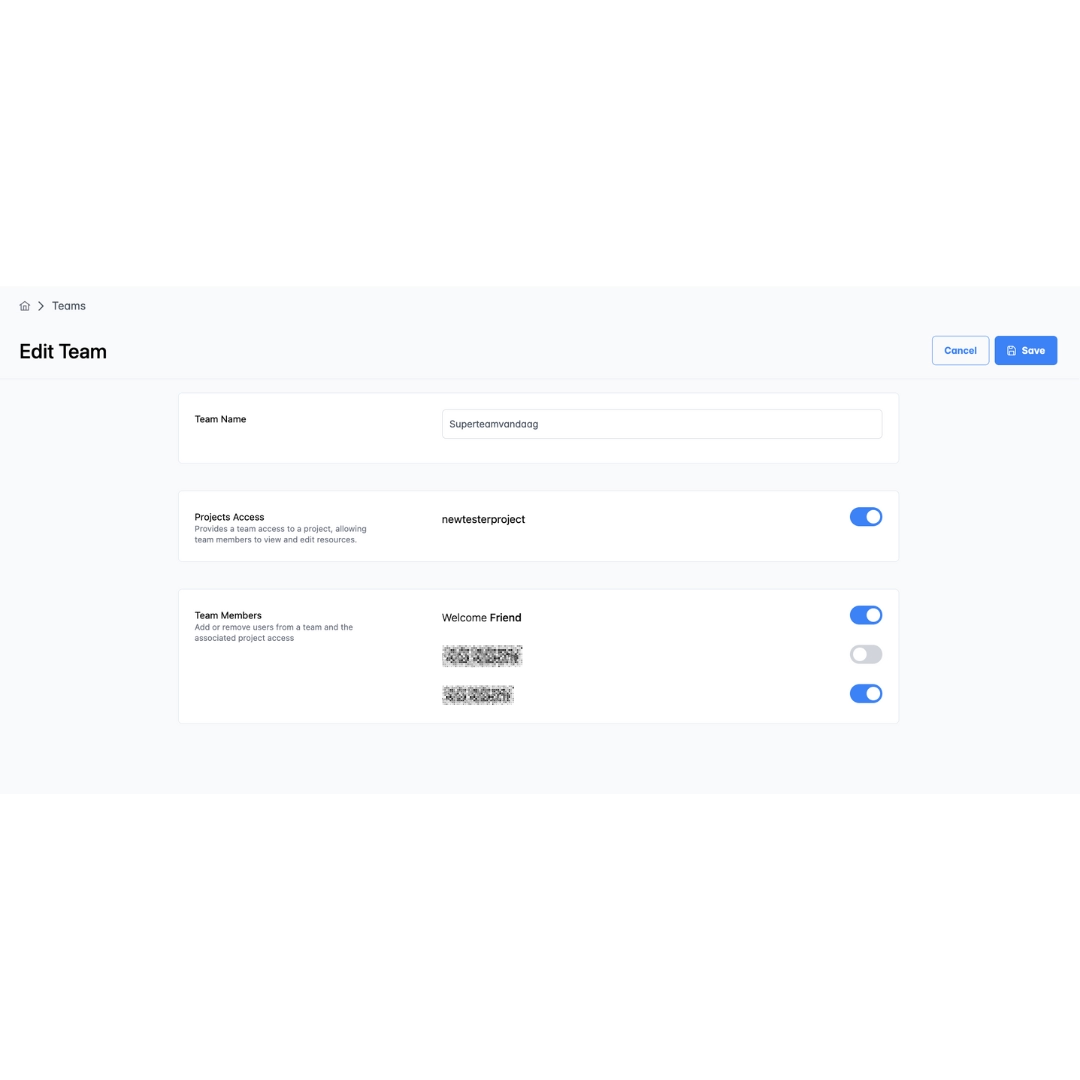
To add members:
- Navigate to Users
- Use the 'Invite User' button to send them an invite.
To remove members:
- Navigate to Teams, select the team, and toggle the team assignment
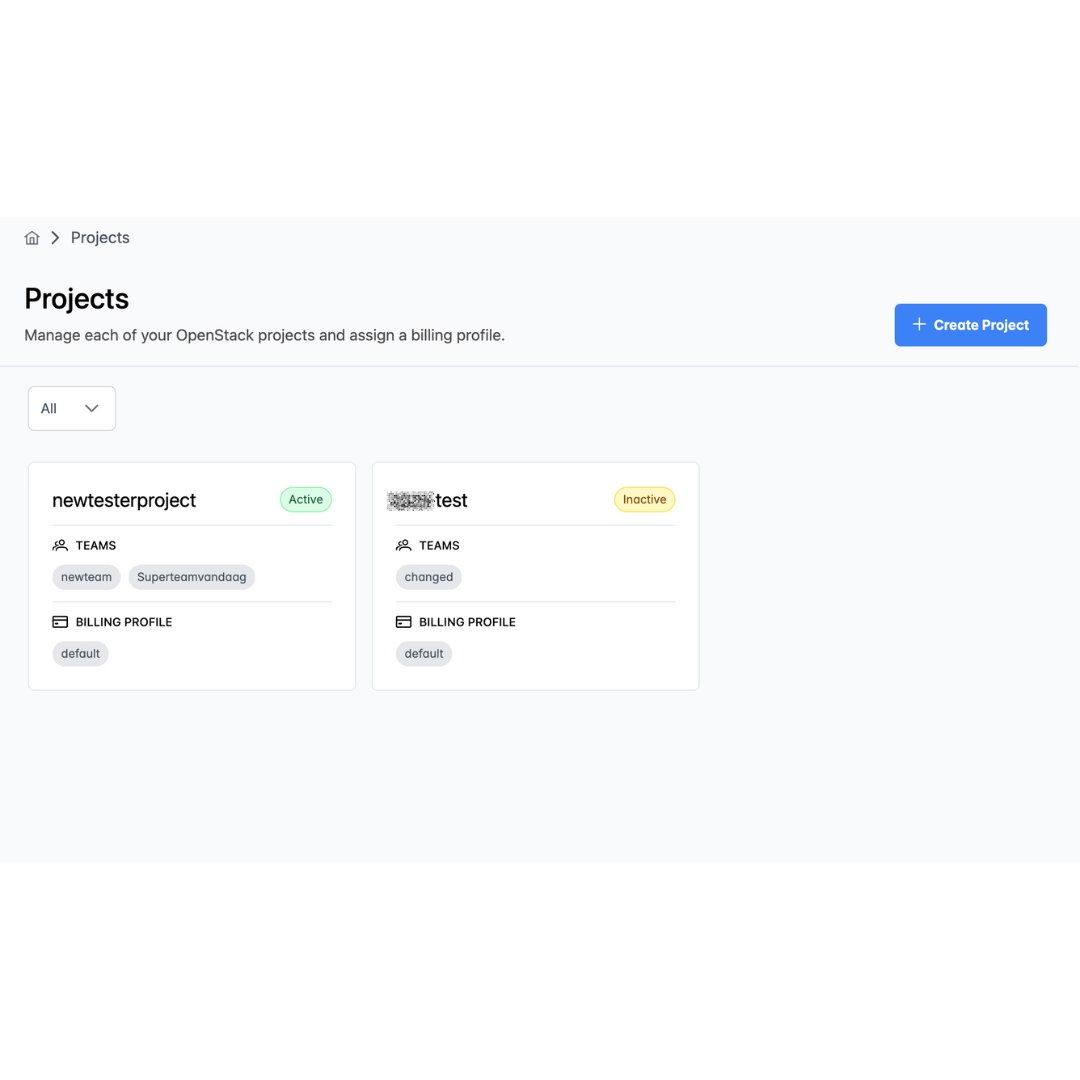
How can I add or remove members to my project?
You can add teams to a project and add users to a team. Individual users are assigned to a team, and teams can be wholly assigned to a project
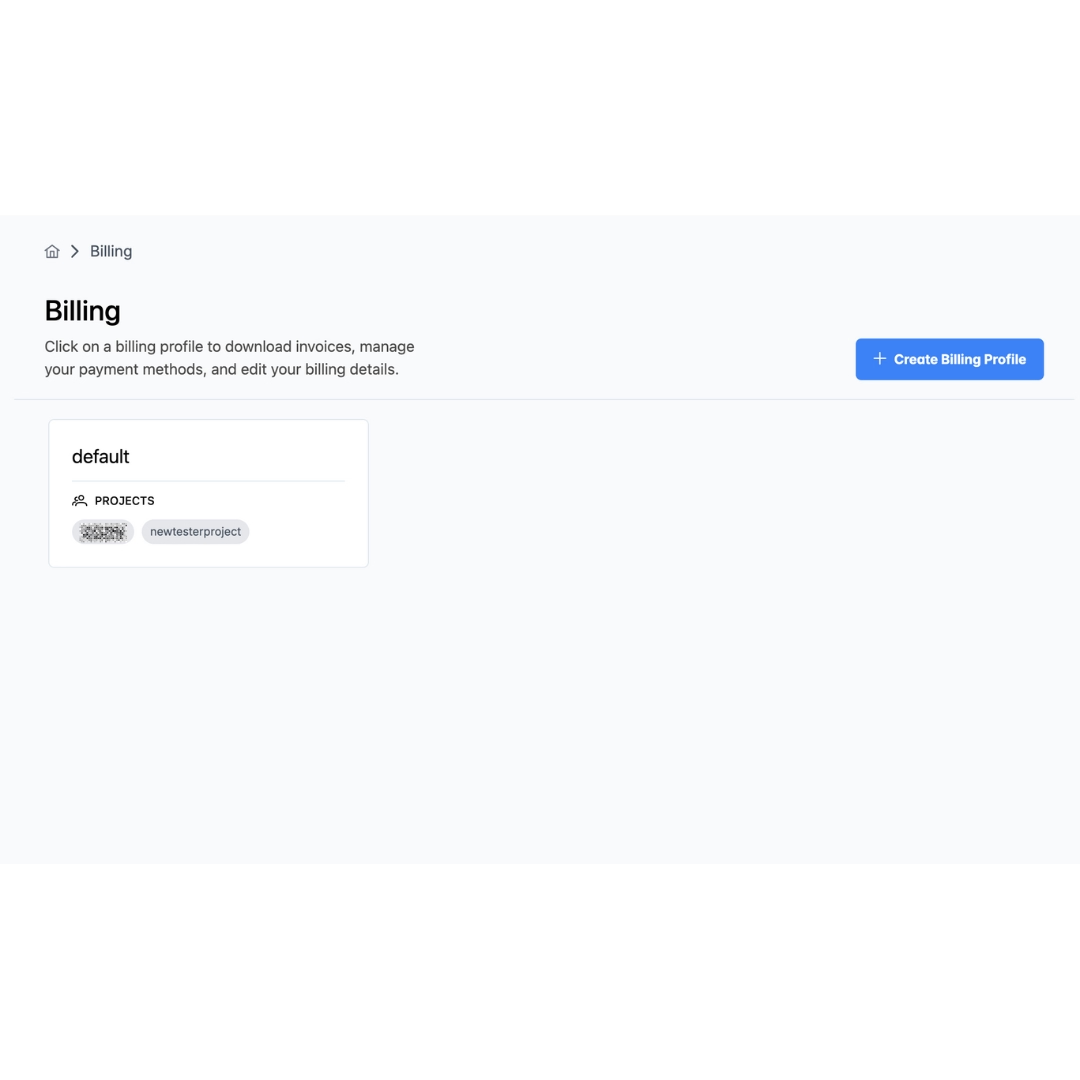
How can I change my billing contact information?
You can change your billing information by navigating to the Billing tab on your dashboard. Here you can create billing profiles, view the attached projects, update billing information, select your payment method, and view your invoices.
How can I change the name of my organization?
Contact Leafcloud support through support email.
How can I connect to my Kubernetes cluster?
Gardener has its own command-line tool called gardenctl. You can use gardenctl to connect to your cluster and manage your garden.
- Install Gardenctl: Follow the installation instructions provided in the Leafcloud documentation.
- Connect to Your Cluster: Use gardenctl commands to access and manage your Kubernetes cluster efficiently. For detailed steps, refer to the Leafcloud Gardenctl Documentation.
How can I contact Leafcloud support?
For support using your Leafcloud account or questions regarding availability, you can contact Leafcloud here, or by email at hello@leaf.cloud.
How can I make sure I no longer receive invoices from Leafcloud?
Ensure no active services (volumes, instances, floating IPs, load balancers, or storage) are visible on your dashboard. Set your instance status to 'shelved' to avoid incurring costs. If no active services are visible and you still receive invoices, contact support here.
How can I manage and create Kubernetes clusters?
You can manage and create Kubernetes clusters (shoots) using Gardener in two main ways:
- Declaratively with YAML:
- Define cluster configurations in YAML files.
- Use gardenctl to apply these configurations, creating or updating clusters as specified.
- Via the Gardener UI:
- Access the Gardener dashboard at dashboard.gardener.leaf.cloud.
- Use the intuitive interface to manage and create clusters. Both methods offer flexible and efficient cluster management. For detailed instructions, visit the Leafcloud Gardenctl Documentation.
How can I reset my password?
You can change your password and 2FA settings on the Account Info page.
If you have forgotten your password, use the Forgot Password link on the sign-in page.
How can I update or change my billing method?
You can update or change your billing method by navigating to the Billing tab on your dashboard. Select your billing profile select Payment Method.
How do snapshots work and what do they cost?
Snapshots create point-in-time copies of your volumes for backups or cloning:
# Create a snapshot
openstack volume snapshot create --volume my-volume backup-snapshot

# Restore from snapshot (create new volume)
openstack volume create --snapshot backup-snapshot restored-volume

# Clone for dev/staging
openstack volume create --source backup-snapshot dev-clone
Pricing:
- Volume snapshots: €0.10/GB/month (same as volume storage)
- Volume backups: €0.10/GB/month (full backups with incremental support)
- You only pay for the actual space consumed
Snapshot vs Backup:
- Snapshots: Fast, lightweight, stored alongside volumes. Best for quick clones and short-term recovery points.
- Backups: Full copies with incremental support, stored separately. Best for disaster recovery and long-term retention.
Both are stored on the same Ceph infrastructure with 3x replication for durability. See the pricing page for current rates.
How do commitment discounts work?
On demand is the listed hourly rate, with no minimum. Commit for 6, 12 or 36 months and the 96GB RTX 6000 Blackwell drops from €1.99 to €1.69 per hour. The other tiers have commitment discounts too.
How do I access Leafcloud object storage?
Leafcloud object storage provides multiple access methods for different workflows, all using the S3-compatible API at leafcloud.store endpoint.
1. OpenStack Dashboard (Web UI): Navigate to Object Store > Containers at create.leaf.cloud. Upload files, create containers, and manage permissions through the web interface. Best for manual file management and quick uploads.
2. S3-Compatible Clients:
Use any S3-compatible tool with the endpoint https://leafcloud.store and region europe-nl-ams1:
- AWS CLI:
aws s3 ls --endpoint-url https://leafcloud.store - rclone: Configure with S3-compatible provider type
- Cyberduck: Add S3 connection with custom endpoint
- s3cmd: Configure with leafcloud.store endpoint
- MinIO Client (mc):
mc alias set leafcloud https://leafcloud.store
3. Programmatic Access (SDKs):
- Python (boto3): Configure with endpoint_url='https://leafcloud.store'
- Node.js (AWS SDK): Set endpoint and region in client config
- Go (AWS SDK): Use custom endpoint resolver
- Java/C#/.NET: All AWS SDKs work with custom endpoint
EC2 Credentials Setup: S3 access requires EC2 credentials (separate from dashboard login). Create them via OpenStack CLI:
openstack ec2 credentials create
This returns an access_key and secret_key for S3 API authentication. Store these securely—the secret is only shown once.
Environment Variables Example:
export AWS_ACCESS_KEY_ID="your-access-key"
export AWS_SECRET_ACCESS_KEY="your-secret-key"
export AWS_ENDPOINT_URL="https://leafcloud.store"
export AWS_DEFAULT_REGION="europe-nl-ams1"
Common Use Cases: Dashboard for manual operations, CLI tools for automation, SDKs for application integration, rclone for sync/backup workflows.
How do I configure my S3 client for Leafcloud object storage?
Connection details:
- Endpoint:
leafcloud.store(orhttps://leafcloud.store) - Region:
europe-nl-ams1 - Path Style: Enable "Path Style" or "Use path style URLs"
Cyberduck example:
- Connection type: Amazon S3
- Server:
leafcloud.store - Access Key ID: Your EC2
accesskey - Secret Access Key: Your EC2
secretkey
MinIO Client (mc) example:
mc alias set leafcloud https://leafcloud.store YOUR-ACCESS-KEY YOUR-SECRET-KEY
mc ls leafcloud
boto3 (Python) example:
import boto3

s3 = boto3.client(
    's3',
    endpoint_url='https://leafcloud.store',
    aws_access_key_id='YOUR-ACCESS-KEY',
    aws_secret_access_key='YOUR-SECRET-KEY',
    region_name='europe-nl-ams1'
)
How do I create and attach a block storage volume?
Creating and attaching a volume takes three simple steps using the OpenStack CLI:
# 1. Create a volume (100GB SSD example)
openstack volume create --size 100 my-volume

# 2. Attach it to your instance
openstack server add volume my-instance my-volume

# 3. Format and mount (on your VM)
sudo mkfs.ext4 /dev/vdb
sudo mkdir -p /mnt/data
sudo mount /dev/vdb /mnt/data
You can also create and attach volumes through the OpenStack Horizon dashboard with a point-and-click interface.
See our Quick Start guide for complete setup instructions including making mounts persistent across reboots.
How do I delete my Leafcloud account?
Go to my.leaf.cloud and click Settings in the main menu. There you’ll find options to close your account or your entire organization.
When you choose to close your organization, you will be prompted to remove all instances and volumes from your projects first.
How do I deploy? Is there anything proprietary to learn?
No. Tick "Enable GPU" when you sign up, then create servers from the OpenStack dashboard, the CLI or Terraform. Kubernetes GPU clusters run via Gardener. SSH, Docker and root are always underneath. It behaves like your machine, not a notebook.
How do I determine which type of architecture to use?
Consider the following factors:
- Performance Needs: Does the application require high processing speed or handle large data volumes efficiently?
- Scalability Requirements: How will traffic and data volume scale over time?
- Complexity of Interactions: Is there a need for complex interactions between different parts of the system?
Conducting a proof-of-concept or pilot study is recommended to validate scalability, performance, and maintainability. We're here to help. Email us at hello@leaf.cloud or schedule a call.
How do I determine which type of machine to use?
Selecting the right VM depends on your workload characteristics and resource requirements.
Sizing Guidance:
- CPU: Monitor your application's CPU utilization. If consistently above 70%, upgrade to more vCPUs or compute-optimized flavors.
- Memory: Out-of-memory errors or heavy swap usage indicate need for more RAM or memory-optimized instances.
- Storage: Local NVMe SSD for performance, network volumes for persistence and larger capacity needs.
Best Practice: Start with a general-purpose VM, monitor resource usage with OpenStack metrics, then resize as needed. You can scale up/down without data loss using OpenStack's resize feature.
Need help? Our Amsterdam-based team can analyze your workload and recommend optimal configurations. Email hello@leaf.cloud or schedule a call.
How do I enable 2FA for OpenStack?
For all portals within the Leafcloud ecosystem, 2FA is required by default. You will be prompted to set this up the first time you log in to the platform.
How do I enable Managed Kubernetes on a project?
Navigate to Projects on your dashboard. Select your project and tick the checkbox in the section with the red outline. Note: Managed Kubernetes cannot be switched off but does not accrue additional costs unless you create a cluster.
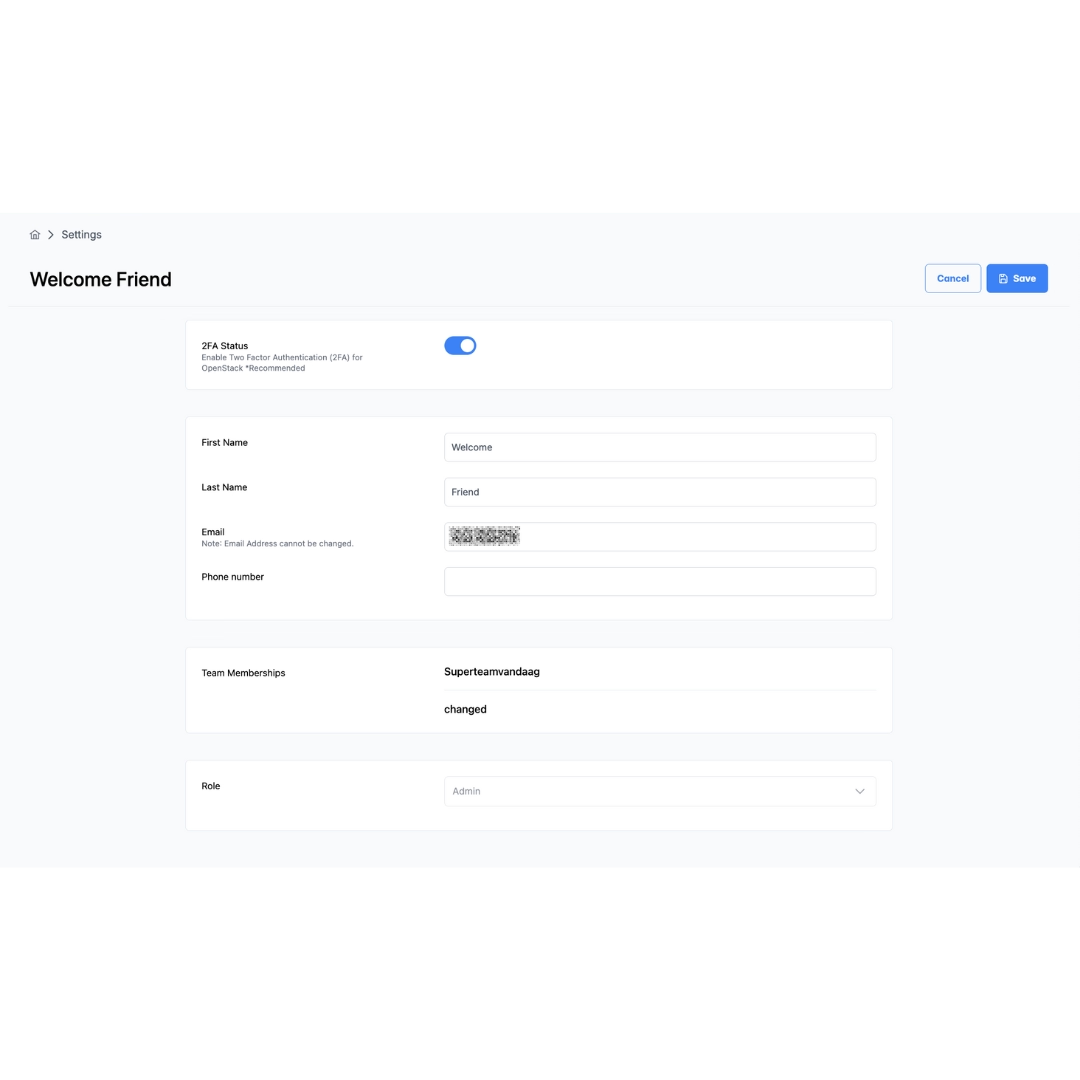
How do I make changes to the roles in my teams?
Admins can edit users in the Users section of their dashboard and select a role from the dropdown list.
How do I manage which users can access my project?
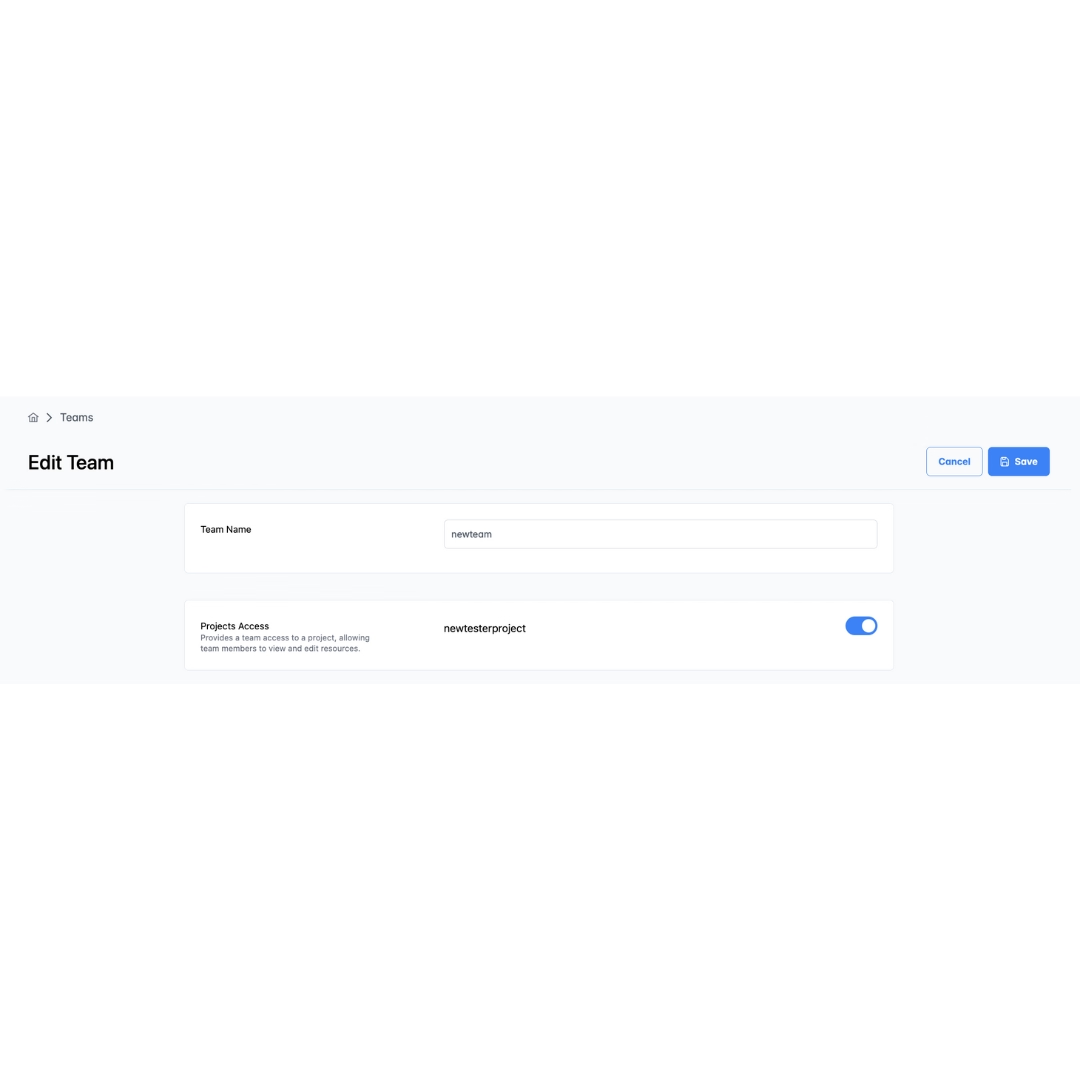
Go to Teams, select the team you would like to add to a project. Toggle the project from list.
How do I see information about my upcoming bills?
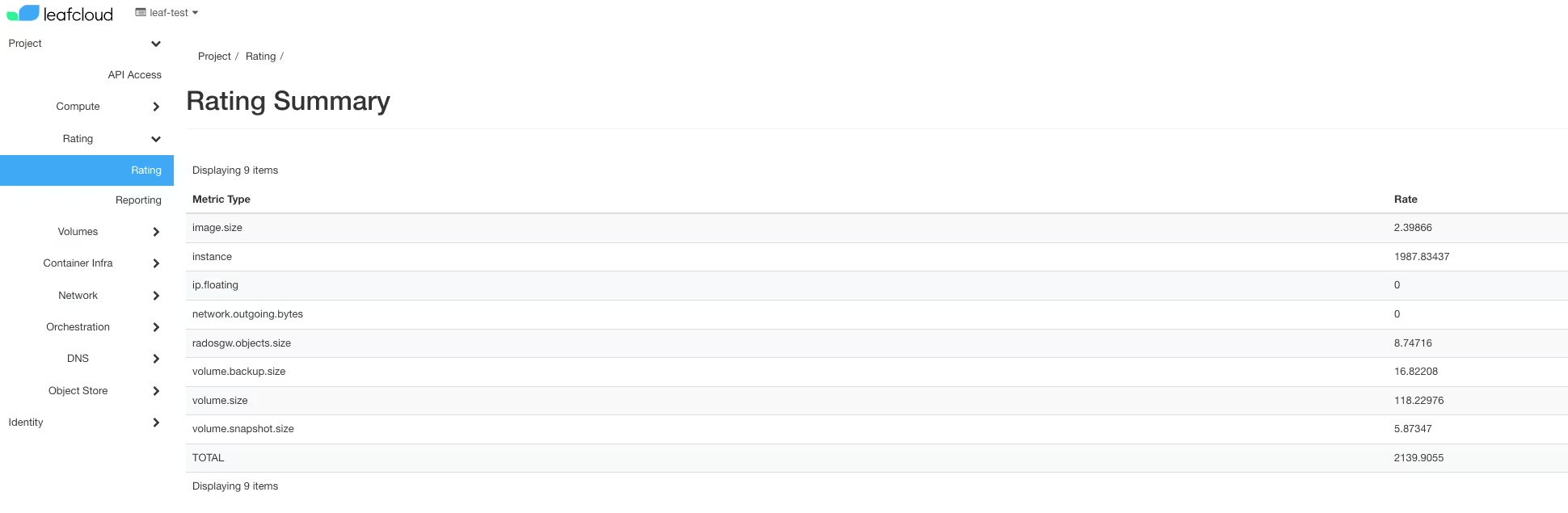
To get a forecast of your next monthly bill, you can check your ‘Rating’ on the Leafcloud cloud control panel. The column 'Rate' indicates the accrued price. The 'Total' row shows your total accrued usage in Euros. Prices listed are in Euros and before any discounts.
How do I start a Leafcloud GPU instance?
Starting a Leafcloud GPU instance is straightforward with multiple deployment methods to match your workflow.
Dashboard (OpenStack Horizon): Sign up at leaf.cloud/signup and ensure you tick "Enable GPU" during registration. Once approved, log into the OpenStack dashboard, navigate to Compute > Instances > Launch Instance, and select a GPU flavor (eg1.a30x1.V8-32 for single A30, eg1.h100x8.V192_768 for H100). Choose your image, configure networking, and launch. Full GPU access in minutes.
OpenStack CLI: Install the OpenStack CLI client and authenticate with your credentials. Use openstack flavor list | grep eg1 to view GPU flavors, then openstack server create --flavor eg1.a30x1.V8-32 --image ubuntu-22.04 --network your-network gpu-instance to launch via command line.
Terraform: Use our community-driven Terraform module at github.com/leafcloudhq/tf-leafcloud-opencode. Infrastructure as code makes GPU provisioning reproducible and version-controlled. Perfect for CI/CD pipelines and team environments.
Kubernetes (Gardener): Deploy GPU-enabled Kubernetes clusters via dashboard.gardener.leaf.cloud. Select GPU node pools with H100, A100, or A30 workers. Kubernetes-native GPU scheduling with auto-scaling and hibernation support. See our guide at /blog/provision-gpus-using-gardener-kubernetes/.
How do I start a private LLM?
You can find a step-by-step guide in our documentation here.
How do I start a truly green WordPress server?
You can find a step-by-step guide in our documentation here
How does your GPU waste heat reuse actually work?
Our servers don't live in traditional datacenters. They're installed inside Dutch residential buildings where their waste heat feeds the hot-water systems for showers and heating. The heat is metered, TNO-audited, and measured as the gas equivalent of heat delivered. Your GPU workload literally heats Dutch homes. Learn more about how we make cloud computing truly green.
How does Leafcloud's disaggregated storage work?
Leafcloud uses disaggregated storage architecture: compute and storage are cryptographically separated for enhanced security.
The architecture:
- Core (centralized storage): All persistent data is stored at our secure Amsterdam datacenter (Tier III facility). This includes volumes, object storage, snapshots, and backups.
- Leaf sites (distributed compute): Virtual machines run at distributed locations across the Netherlands for heat reuse. These sites process workloads only - no persistent data is stored here.
How it works: When a virtual machine starts at a Leaf site, it connects to its storage volume located at Core over a private encrypted network connection. Only the data blocks needed for current processing are retrieved and kept in RAM at the compute node. When processing is complete, data is written back to Core storage and removed from the Leaf site.
Why this is secure: Even if a Leaf site server were physically compromised, no customer data could be extracted. Data exists at Leaf sites only transiently in RAM during processing. Persistent storage remains at the secure Core facility.
Encryption: Data is encrypted in transit (TLS 1.3) between Leaf sites and Core, and encrypted at rest (AES-256) at Core storage. All volumes use Linux Unified Key Setup (LUKS) full disk encryption by default.
This architecture enables Leafcloud's heat-reuse model (compute servers in residential buildings) while maintaining enterprise-grade data security.
How does Leafcloud ensure infrastructure resilience and high availability?
Leafcloud's infrastructure is designed with multiple layers of resilience to ensure high availability for your workloads.
Datacenter-level resilience (core locations)
Leafcloud's core infrastructure is hosted in Tier III datacenters in the Netherlands. These facilities are designed for high availability and include multiple layers of power redundancy:
- Redundant power feeds from the electricity grid where available
- UPS systems that provide immediate battery-backed power when grid power fails
- Backup generators that automatically start during longer outages
- Redundant electrical distribution within the datacenter to prevent single points of failure
In practice, short power interruptions are absorbed by the UPS systems while generators take over during extended outages.
Leaf site resilience
Leafcloud also operates smaller distributed deployments called Leaf sites. These sites include UPS backup capacity and are designed with inherent resilience through automatic failover mechanisms.
If a local power outage occurs at a leaf site, the UPS provides a window during which the platform automatically attempts to live migrate running workloads to other available infrastructure. This auto failover design ensures that your workloads remain available even when individual sites experience issues.
Choose different deployment approaches:
- Core compute can be used when higher single-instance resilience is required
- Applications can run across multiple instances to tolerate individual node failures
Multi-availability zone architecture
From summer 2026, Leafcloud will support deployments across two availability zones. This enables customers to design applications that remain available even if an entire site or datacenter becomes unavailable.
Typical approaches include:
- Running redundant application instances in both zones
- Using load balancing between zones
- Replicating stateful services across zones
How does Leafcloud provide truly green cloud?
Servers use energy to do calculations, all of which is turned into heat. In a typical data center, this heat is thrown away through cooling systems.
Leafcloud's approach: We put our servers where heat is needed – places like swimming pools, apartment complexes, and nursing homes – and replace natural gas for heating with our server heat.
The result: Energy is productive twice – first for computing, then for heating buildings. This eliminates waste and displaces fossil fuel use.
How does Leafcloud's sustainability differ from hyperscalers?
Your workload provides people in nursing homes and apartment blocks with emissions-free hot showers. Leafcloud operations are carbon-negative (-1.93 tonnes CO₂/kW-year at Leafsite (figures from 2024)) by reusing server heat to warm water for residential buildings. We don't offset, trade carbon-credits, or hide our emissions in Scope 3—we eliminate emissions through actual heat recovery.
How does the Managed Kubernetes setup work?
The Kubernetes setup consists of several parts:
- Control Plane: Managed by Leafcloud, it oversees the Kubernetes cluster.
- Worker Nodes: Created in the customer's OpenStack project to run applications and workloads.
- Networking: Configured in the customer's OpenStack project to connect worker nodes and resources.
- Security Groups: Enhance security and control network access in the customer's OpenStack project.
How does the upgrade process work using the Gardener UI?
The upgrade process includes:
- Node Replacement: Nodes are replaced one by one when changing the Kubernetes version.
- Workload Migration: Workloads from old nodes are automatically migrated to the new nodes.
- Seamless Transition: Ensures minimal downtime, maintaining consistency and smooth operation.
How is Leafcloud able to be more affordable per core than traditional providers?
Leafcloud VMs are more affordable due to our innovative heat reuse model and efficient Dutch operations—without compromising on performance or reliability.
Heat Reuse Infrastructure: We don't build expensive traditional datacenters. Instead, our servers are housed in residential buildings where waste heat from compute workloads warms homes and offices. This partnership with NorthC eliminates costly cooling infrastructure that hyperscalers pass on to customers. A typical datacenter spends 30-40% of energy costs on cooling; we turn that expense into a community benefit.
No Datacenter Overhead: Traditional cloud providers build massive datacenters with redundant cooling, power distribution, and physical security systems. These capital costs get amortized across all customers. By placing servers in buildings that need heating, we avoid these expenses entirely while maintaining ISO 27001 and SOC2 compliance.
No US Markup: Unlike AWS, Azure, or GCP, Leafcloud is Dutch-owned with no US parent company overhead. Hyperscaler EU regions typically charge 20-40% more than their US regions due to regulatory compliance, data sovereignty requirements, and corporate structure costs. We operate locally without these markups.
Transparent Pricing: No hidden fees, complex pricing tiers, or surprise charges. What you see is what you pay. Our pricing starts at €0.01/hour (€7.67/month) for a 1GB VM—straightforward and predictable.
Efficient Scale: Smaller scale allows us to optimize for cost efficiency rather than maximizing profit margins. We pass savings directly to customers while maintaining enterprise-grade infrastructure and certifications.
Open Source Foundation: OpenStack platform means no proprietary licensing costs. Open-source software stack (Linux, Ceph, OpenStack) reduces operational expenses compared to proprietary hypervisor solutions.
How long do my free credits last?
You don't receive any free credits. Instead, once your account has been activated, you will receive a free-use period of two weeks (or 48 hours if you signed up with GPU access). During this time you will not be billed for your usage. After your free-use period expires you will be billed for your usage. You can find more information on our prices at by visiting our pricing page.
How long does a migration actually take?
Containerized workloads typically move in 1 to 4 weeks. EKS to Gardener is mostly a configuration change, and manifests, Helm charts and operators work identically. VM-based workloads import via standard OpenStack tooling. Heavy use of proprietary managed services like Lambda, DynamoDB or SageMaker pipelines extends the timeline, because those get replaced with open-source equivalents first.
How many people can be in a team?
There is no limit to team sizes.
How many people can have access to a project?
There is no fixed limit to the number of people that can be granted access to a project
How much CO₂ does Leafcloud save compared to traditional cloud?
Up to 1,776 kg CO₂ per kilowatt-year by displacing natural gas heating. This varies by location and heating system efficiency.
How it works: Our carbon reduction comes from repurposing server heat to displace fossil fuel heating—servers generate heat anyway, so we capture it instead of wasting it.
Learn more: See our carbon calculator for specific estimates based on your workload, or read the detailed methodology in our Heating Europe with AI whitepaper.
How much memory does the RTX 6000 Blackwell have?
The NVIDIA RTX 6000 Blackwell has 96GB of GDDR7 ECC memory per GPU with 1,800 GB/s memory bandwidth.
Why 96GB matters for AI workloads:
Large Language Models (LLMs): Run large models in a single GPU with high memory capacity:
- Large parameter models with quantization: 70B models with 4-bit quantization fit comfortably
- Medium models in full precision (FP16/BF16): 30-40B parameter models run smoothly
- Multi-GPU scaling: 2 GPUs = 192GB, 4 GPUs = 384GB total VRAM for even larger models
- Multimodal models: Large vision-language models requiring significant context windows
Comparison to other GPUs:
- H100 (80GB): 20% more memory per RTX 6000 GPU, plus newer Blackwell architecture
- A100 (80GB): Similar capacity, but RTX 6000 has newer architecture with GDDR7
- A30 (24GB): 4x less memory - limited to smaller models or aggressive quantization
Memory bandwidth (1,800 GB/s): Critical for inference throughput. Higher bandwidth means faster token generation for LLMs and better performance for batch inference.
ECC (Error-Correcting Code): Enterprise-grade reliability - detects and corrects memory errors during long-running training or inference jobs.
Practical implications: With 96GB GDDR7 memory per GPU and Blackwell architecture, the RTX 6000 offers excellent value for production inference workloads, balancing capacity, performance, and cost efficiency. Scale from 1 to 4 GPUs based on model size requirements.
How predictable is dynamic pricing?
Very predictable for planning purposes. The day-ahead electricity market publishes tomorrow's hourly prices around 14:00 CET each day, so you can see exactly when the cheapest hours will be and schedule flexible workloads accordingly.
How does billing work?
Pay-per-million-tokens, no minimums, no subscriptions. Usage-based billing calculated monthly, charged in arrears like your Leafcloud GPU instances.
No idle costs. You only pay for tokens processed. No capacity planning, no reserved instances, no "contact sales" walls. Full pricing (per model, per million tokens) will be published on this page before launch.
Same billing system as the rest of Leafcloud: transparent rates, monthly invoices, no surprises. Add credits to your account or pay by invoice; your choice.
Is my data subject to the US CLOUD Act?
No. Leafcloud is a Dutch company on Dutch-owned infrastructure with no US parent entity, so there is no CLOUD Act path to your prompts, outputs, or logs. Learn more about our approach to digital sovereignty.
Will my existing code really work?
Yes. The endpoint follows the OpenAI API schema, the de facto standard every SDK and framework speaks, regardless of provider. You change base_url and the model name; the rest of your code, including LangChain and LlamaIndex, keeps working.
What models will be available?
Launch lineup includes Llama 3.1 and 3.2 (8B, 70B), Mistral 7B and Mixtral, Qwen 2.5 (7B, 32B), plus embedding models (all-MiniLM, multilingual-e5) and Whisper for transcription.
Full model catalog with context lengths and pricing will be published before launch. Need a specific model? Tell us on the waitlist form. Pilot access prioritizes teams who specify what they'll build.
Where are the servers located?
All inference servers run in Amsterdam, the Netherlands, with data processed exclusively within EU borders. No US parent entity, no CLOUD Act exposure.
Leafcloud is Dutch-owned and operated. The GPUs serving your prompts sit in our Amsterdam datacenter, where their heat warms residential buildings through the Lelystad district heating network. Your data never touches US soil or jurisdictions, by design, not just policy.
Do you train on my prompts?
No. We serve open-weight models and don't build our own, so your inputs and outputs are not training data. Retention is limited to billing and abuse prevention; the exact policy ships with the launch documentation.
Is 50 hours enough to get real work done?
Yes. 50 hours on a 24GB GPU slice lets you run Llama 3.1 8B at full precision, generate images with SDXL, or fine-tune models with LoRA. You get a real server with SSH access and persistent storage—not a notebook environment. For workload specifics and what fits in 24GB VRAM, see our RTX 6000 Blackwell GPU specifications.
Is my data encrypted on block storage?
Yes. Leafcloud block storage supports encryption both at rest and in transit:
Encryption at Rest (LUKS): All volumes support Linux Unified Key Setup (LUKS) encryption, with cryptographic keys under your control:
# Format volume with LUKS encryption
sudo cryptsetup luksFormat /dev/vdb

# Open encrypted volume
sudo cryptsetup luksOpen /dev/vdb my-encrypted-volume

# Mount as usual
sudo mkfs.ext4 /dev/mapper/my-encrypted-volume
sudo mount /dev/mapper/my-encrypted-volume /mnt/secure
Encryption in Transit (TLS): All data transfer between instances and the Ceph storage cluster uses TLS encryption, protecting data as it moves across the network.
Key Management:
- You control the encryption keys (LUKS passphrases)
- Keys never leave your instance
- Leafcloud has no access to your encrypted data content
For compliance requirements (GDPR, ISO 27001), encrypted volumes ensure data remains secure even if physical disks are compromised. Performance impact is minimal on modern CPUs with AES-NI acceleration.
Is heat reuse actually effective or is this greenwashing?
Servers convert 99%+ of electricity to heat—this is basic thermodynamics, not marketing. Leafcloud captures nearly all of this heat and transfers it to building hot water systems.
The methodology is detailed in our Heating Europe with AI whitepaper.
Unlike carbon offsets (tree planting, renewable credits), heat reuse directly prevents fossil fuel consumption—the natural gas that would have heated water is simply not burned.
Is Leafcloud actually outside US CLOUD Act reach?
Yes. Leafcloud B.V. is a Dutch company with no US parent, investors or board members, so the CLOUD Act and FISA don't apply. That covers everything in an AI stack: training data, model weights, prompts and outputs, embeddings and logs. US authorities would need an MLAT request with EU judicial review, not an administrative subpoena.
Is Leafcloud carbon-negative?
Yes and no, the least consuming workload is the one not started, and we do not magically pull CO2 out of the air. However, the current standard is large data centers cooled with air-conditioning and large apartment complexes heated with natural gas or other fossil fuels. Let's say both use one unit of energy. Because Leafcloud places servers where heat is needed, and the building uses that heat instead of generating it with the equivalent amount of natural gas, we have minus one energy use for society. That's already 'carbon negative' with a new workload and even more when moving a workload from a traditional or hyperscale data center to Leafcloud.
Is Leafcloud GDPR compliant?
Yes. Leafcloud is GDPR compliant.
EU data residency: All Leafcloud servers are located in Amsterdam, Netherlands. Data never leaves the Netherlands unless you explicitly transfer it. This ensures GDPR compliance by default.
Data Processing Agreement (DPA): Leafcloud provides a standard Data Processing Agreement that outlines our commitment to data protection and GDPR compliance. The DPA is available for download at https://leaf.cloud/security or upon request.
What the DPA covers:
- How we process and protect your data
- Data location and residency guarantees
- Sub-processor disclosure
- Your rights as data controller
- Our obligations as data processor
- Security measures and incident notification
- Data subject access request procedures
No third-country transfers: Leafcloud does not transfer data to countries outside the EU/EEA. We are not subject to US jurisdiction (no US CLOUD Act exposure).
Compliance documentation: For procurement processes requiring GDPR compliance verification, we can provide:
- Signed Data Processing Agreement
- Data residency attestation
- ISO 27001 and SOC2 certificates (which include data protection controls)
- Jurisdiction verification letter
For procurement support or to request a custom DPA, contact hello@leaf.cloud.
Is Leafcloud NIS2 compliant?
Leafcloud's infrastructure is designed to align with NIS2 directive requirements.
What is NIS2? The NIS2 Directive (Network and Information Security Directive 2) is EU legislation that sets cybersecurity requirements for operators of essential services and digital infrastructure providers. It applies to sectors including energy, transport, healthcare, financial services, and digital infrastructure.
NIS2 requirements: Organizations subject to NIS2 must:
- Implement appropriate security measures (risk assessment, incident handling, business continuity, supply chain security, encryption)
- Report significant incidents to authorities within 24-72 hours
- Ensure supply chain security (including cloud providers)
- Maintain governance and accountability
Leafcloud's alignment:
- Security controls: ISO 27001 and SOC2 Type II certified infrastructure meets many NIS2 security requirements
- Incident response: Established incident notification and response procedures
- EU sovereignty: No US CLOUD Act exposure reduces supply chain security risk
- Encryption: AES-256 at rest, TLS 1.3 in transit
- GDPR compliance: NIS2 includes GDPR alignment requirements
- Governance: Regular third-party audits and compliance reviews
For regulated entities: If your organization is subject to NIS2 and requires cloud infrastructure that meets the directive's requirements, Leafcloud can provide:
- Security control documentation
- Incident response procedures
- Compliance attestation letters
- Supply chain security verification
Contact hello@leaf.cloud for NIS2 compliance documentation for procurement.
Is Leafcloud subject to the US CLOUD Act?
No. Leafcloud is not subject to the US CLOUD Act.
Leafcloud is a Dutch company with no parent company outside the European Union. We are not subject to the US CLOUD Act, FISA (Foreign Intelligence Surveillance Act), or any other non-EU data access laws.
Why this matters: The US CLOUD Act allows US government agencies to compel US-based companies (and their subsidiaries) to provide data stored anywhere in the world, even if that data is stored in the EU. This applies to US hyperscalers like AWS, Microsoft Azure, and Google Cloud, even when they operate "EU regions" with servers physically located in Europe.
Leafcloud's jurisdiction: Dutch law applies. Your data cannot be compelled by US government requests. If a Dutch court orders data access, we will notify you whenever legally permitted. Dutch law may prohibit disclosure in certain ongoing criminal investigations, though such restrictions are more limited than US gag orders.
This makes Leafcloud true EU-sovereign cloud infrastructure, distinct from hyperscaler "EU regions" which remain subject to US jurisdiction despite server location.
For sovereignty verification documentation for procurement, contact hello@leaf.cloud.
Is my data subject to the US CLOUD Act?
No. Leafcloud is a Dutch company running on Dutch infrastructure with no US parent entity. Unlike EU regions of US-parented clouds (AWS, Azure, GCP), there is no CLOUD Act path to your data. Your AI workloads and model weights stay under EU jurisdiction. Learn more about our approach to digital sovereignty.
Is my data subject to US jurisdiction on Leafcloud?
No. All infrastructure is in Amsterdam, Netherlands. Your data never leaves Europe, ensuring full GDPR compliance without US CLOUD Act concerns.
Is OpenStack compatible with Terraform?
Yes. OpenStack has full Terraform support through the official OpenStack Terraform provider maintained by the OpenStack community.
Terraform OpenStack Provider:
- Provider name:
terraform-provider-openstack - Maintained by: OpenStack community with active development
- Documentation: Complete resource and data source documentation at registry.terraform.io/providers/terraform-provider-openstack
- Stability: Production-ready and widely used in enterprise deployments
What you can provision with Terraform + OpenStack:
- Compute: Virtual machines (Nova instances) with custom specs
- Networking: Networks, subnets, routers, security groups, floating IPs
- Storage: Block storage volumes (Cinder), object storage containers (Swift)
- Load balancing: Octavia load balancers for high availability
- Kubernetes: Cluster provisioning via Magnum or Gardener
- Images: Custom VM images via Glance
- DNS: DNS zones and records via Designate
Example Terraform configuration:
terraform {
  required_providers {
    openstack = {
      source  = "terraform-provider-openstack/openstack"
      version = "~> 1.54"
    }
  }
}

provider "openstack" {
  auth_url    = "https://api.leaf.cloud:5000/v3"
  user_name   = "your-username"
  password    = "your-password"
  tenant_name = "your-project"
  domain_name = "default"
}

resource "openstack_compute_instance_v2" "web_server" {
  name            = "web-server-01"
  image_name      = "Ubuntu 22.04"
  flavor_name     = "c1.small"
  security_groups = ["default", "web"]

  network {
    name = "private-network"
  }
}
Benefits of Terraform + OpenStack:
- Infrastructure as Code: Version-controlled, repeatable deployments
- Multi-cloud support: Same Terraform workflow across OpenStack and other providers
- State management: Track infrastructure changes and dependencies
- Modules: Reusable infrastructure components
- Provider portability: Switch OpenStack providers without major refactoring
Leafcloud fully supports the OpenStack Terraform provider - provision GPU instances, Kubernetes clusters, and networking infrastructure with standard Terraform workflows.
Is the VM included in the listed GPU price?
Yes, the VMs corresponding to the 1, 2, 4, or 8 GPU machines are included in the listed price.
Is the Zaandam case study data verified?
Yes. The Zaandam nursing home deployment uses calibrated energy meters that tracked a full calendar year of operation in 2024. All carbon accounting uses official Dutch government CO₂ emission factors from rijksdienst voor Ondernemend Nederland.
Is there a free way to try it?
Yes, your first 48 hours are free. Sign up with a €200 deposit and nothing you use in the first 48 hours is billed. Run a real workload on real hardware before you spend anything on compute. After that, normal per-hour billing applies.
I've received an invoice for a service I thought was removed. What happened?
Most likely, you have not fully removed one or more of your active services. Check for active services like volumes, instances, floating IPs, load balancers, or storage on your dashboard.
To avoid costs, ensure the status of your instance is set to 'shelved.' If no active services are visible, contact support here.
Hoe automatiseert KubeDNA de BIO en ENSIA compliance?
KubeDNA heeft ingebouwde policy enforcement en continuous compliance monitoring. Het platform controleert automatisch of workloads voldoen aan BIO-normen en ENSIA-eisen, en blokkeert non-conforme configuraties. U ontvangt real-time rapportages en alerts. Dit bespaart enorm veel handmatig werk en reduceert het risico op menselijke fouten.
Hoe lang duurt een volledige migratie naar KubeDNA + Leafcloud?
De POC duurt 6-8 weken, waarin we 1 workload migreren en alle compliance-analyses leveren. Bij een positieve beslissing kan een volledige migratie van uw IT-omgeving variëren van enkele maanden tot een jaar, afhankelijk van de complexiteit en het aantal workloads. Tijdens de POC maken we een gedetailleerd migratieplan op maat.
Welke ondersteuning krijgen we tijdens en na de POC?
Tijdens de POC krijgt u dedicated technische ondersteuning van zowel KubeDNA als Leafcloud engineers. Na go-live is er 24/7 monitoring, SLA-gebaseerde support, en doorlopende updates. We bieden ook training voor uw IT-team en documentatie in het Nederlands. U bent nooit alleen – we zijn partner in uw digitale transformatie.
Hoe werkt het hergebruik van server-warmte precies?
Leafcloud plaatst servers in verwarmde gebouwen zoals verpleeghuizen en appartementencomplexen in de regio Amsterdam. De warmte die servers produceren wordt via warmtepompen omgezet in 60°C warm water voor verwarming en sanitair. Dit vervangt gas- of elektrische verwarming. Het is meetbaar en rapporteerbaar aan de gemeenteraad voor duurzaamheidsdoelen.
Hoe voorkomt KubeDNA vendor lock-in?
KubeDNA is gebouwd op open-source Kubernetes en standaard cloud-native technologieën. Er zijn geen proprietary services of lock-in mechanismen. Als u ooit wilt migreren naar een andere cloud provider, kunt u uw workloads zonder aanpassingen verplaatsen. Dit geeft u volledige flexibiliteit en controle, in tegenstelling tot hyperscaler-specifieke services.
Wat is het verschil tussen KubeDNA + Leafcloud en hyperscalers zoals Azure, AWS of Google Cloud?
KubeDNA + Leafcloud is volledig Nederlands, wat betekent dat uw data onder Nederlandse en Europese wetgeving valt (niet onder Amerikaanse Cloud Act). Daarnaast automatiseert KubeDNA compliance met BIO en ENSIA, wat bij hyperscalers handmatig moet. Tot slot hergebruiken wij server-warmte lokaal voor verwarming, wat hyperscalers niet doen.
Wat kost de Proof of Concept?
De POC van 6-8 weken kost €5000. Tijdens het intake gesprek bespreken we de kosten en voorwaarden die specifiek zijn voor uw gemeente en workload. Onze POC is ontworpen om u concrete, meetbare resultaten te geven voor een weloverwogen go/no-go beslissing.
Welke workloads zijn geschikt voor KubeDNA + Leafcloud?
Alle container-native en cloud-native workloads zijn geschikt. Denk aan websites, portalen, microservices, API's, databases, en applicaties die draaien op Kubernetes. Ook legacy applicaties kunnen worden gecontaineriseerd. Tijdens het intake gesprek analyseren we samen welke workloads het meest geschikt zijn voor de POC.
Does Leafcloud contribute to UN Sustainable Development Goals?
Yes. Leafcloud directly supports multiple UN Sustainable Development Goals (SDGs):
- SDG 7 (Clean Energy): Efficient energy use through heat reuse, powered by renewable energy
- SDG 9 (Sustainable Infrastructure): Distributed infrastructure without new construction waste
- SDG 11 (Sustainable Cities): Urban heat reuse reduces building emissions and energy costs
- SDG 12 (Responsible Consumption): Circular energy use—no waste heat
- SDG 13 (Climate Action): Up to 1,776 kg CO₂ reduction per kilowatt-year
We provide CSRD-ready emissions reporting for customers, making it easier for organizations to track and report their progress toward these goals. Reports include specific carbon reduction from heat reuse, enabling customers to include Leafcloud infrastructure in their sustainability reporting.
How does Leafcloud compare to carbon-neutral cloud providers?
Carbon offsets (tree planting, renewable energy credits) reduce net emissions but don't eliminate energy waste. A "carbon-neutral" data center still uses 30-80% extra energy for cooling (PUE 1.3-1.8) and releases heat into the atmosphere—then purchases offsets to compensate.
Leafcloud makes energy useful twice—no waste to offset. The same kilowatt-hour powers computation and heating, displacing fossil fuel consumption directly rather than offsetting it elsewhere. This is comparable to circular economy principles (eliminate waste) versus offsetting (compensate for waste).
Both approaches reduce carbon impact, but heat reuse prevents emissions at the source rather than offsetting them after the fact. We also purchase renewable energy, making our infrastructure both waste-free and renewably powered.
What is the difference between Leafcloud and hyperscaler EU regions?
Leafcloud is EU-sovereign cloud infrastructure. Hyperscaler "EU regions" are physically located in the EU but remain subject to US jurisdiction.
The key difference: Legal jurisdiction
Hyperscaler EU regions (AWS Frankfurt, Azure Netherlands, Google Cloud Belgium):
- Servers physically located in Europe ✓
- Data stored in Europe ✓
- Subject to US CLOUD Act ✗ (parent companies are US-based)
- Subject to FISA and US government data requests ✗
- Can be compelled to provide EU-stored data to US authorities ✗
Leafcloud:
- Servers physically located in Netherlands (Amsterdam) ✓
- Data stored in Netherlands ✓
- Dutch-owned company, no US parent ✓
- Not subject to US CLOUD Act or FISA ✓
- Data cannot be compelled by non-EU government requests ✓
Why this matters:
Under the US CLOUD Act, US government agencies can compel US-based companies (including AWS, Microsoft, Google) to provide data stored anywhere in the world, even data stored in "EU regions". This creates a conflict with GDPR and EU data sovereignty requirements.
EU-sovereign infrastructure means:
- European ownership
- European operations
- European legal jurisdiction
- No exposure to non-EU data access laws
When you need EU sovereignty:
- Dutch public sector (HAVEN+ requirements)
- Regulated industries (healthcare, finance) with NIS2/DORA obligations
- Companies subject to CSRD sustainability reporting
- Organizations with strict data residency requirements
- AI workloads with sensitive training data or model weights
Leafcloud provides true EU sovereignty, not just "EU region" hosting.
Does hosting a Leafsite cost us money?
No upfront costs and no hardware expenses - we own all equipment. You provide the space (10-50 m²), power connection, and water loop access. The power consumed by the servers is metered and paid by Leafcloud.
How long does it take to install a Leafsite?
From application approval to heat delivery: 3-6 months typically. This includes technical assessment (2-4 weeks), permits and approvals (varies by municipality), equipment delivery (6-8 weeks), and installation (1-2 weeks). The actual installation is minimally disruptive - our team works closely with your facility manager to schedule work during convenient times. Most of the plumbing and electrical connections happen in technical areas, not occupied spaces.
Is the heat transfer safe? Does server water mix with building water?
Absolutely safe. Leaf sites use a closed-loop heat exchanger - think of it like a radiator in a car. The server cooling water never mixes with the building's hot water system. Heat energy transfers through metal plates in the heat exchanger, keeping both systems completely separate. This is standard HVAC technology used worldwide, certified to Dutch building codes and European safety standards.
Who maintains the Leafsite equipment? Does our facility team need special training?
Leafcloud handles 100% of maintenance. Our engineers remotely monitor all Leaf sites 24/7 and perform scheduled maintenance visits. If hardware needs replacement, we do it at no cost to you. Your facility team doesn't need any special training - the Leafsite connects to your existing systems like any other heating unit. We provide basic documentation and emergency contacts, but day-to-day operations are fully automated.
What types of buildings qualify to host a Leafsite?
Ideal candidates have year-round hot water demand (minimum 500 GJ/year), available technical space (10-50 m²), three-phase power, and existing hot water heating infrastructure. Perfect fits include swimming pools, nursing homes, apartment buildings, hospitals, office complexes, and buildings with ATES (underground thermal storage) systems. We evaluate each building individually - apply through our form and we'll conduct a free technical assessment to determine feasibility and sizing.
Is it secure to have cloud servers in our building? What about data privacy?
Yes, it's safe. Data is never stored at a Leaf site and no data can be stolen from a compute instance at a Leaf site. You can find out more about Leafcloud security on our Data Security page.
What happens if the servers go offline? Will our building lose heat?
Leaf sites are designed as supplemental heat sources, not primary heating systems. We recommend sizing them at 5-20% of your total thermal load. Your existing boiler, heat pump, or district heating continues to handle the base load. If a Leafsite goes offline (rare, but possible during maintenance), your primary system automatically compensates. You won't notice any temperature changes. The Leafsite is an efficiency booster, not a critical dependency.
What exactly is a Leafsite?
A Leaf site is a small, distributed data center installed inside existing buildings. It runs enterprise cloud workloads (virtual machines, Kubernetes, GPUs) and uses heat recovery systems to capture 95%+ of the heat generated. This heat is then transferred into the building's existing hot water system, providing free heating to residents or facility users. It's sustainable computing that benefits the community directly.
My authorization link has expired, how can I get a new one?
If your authorization link has expired, please send an email to your_company_name@support.leaf.cloud requesting a new authorization link
My volume is stuck in 'reserved' state, how do I change this?
If your volume is stuck in "reserved" state, please send an email to support email.
What are the key terms of the reseller agreement?
The full agreement is four pages. Key terms:
Commercial:
- Discount: Flat percentage off published list prices, fixed per contract year
- Your pricing: You set end-customer prices freely
- Invoicing: Monthly to you, NET 30 payment terms
Operational:
- Support: You handle first-line, we provide second-line via support@leaf.cloud
- SLA: Baseline uptime target above 99.9% (non-binding). Premium SLA available in writing
- Territory: Worldwide (within export-control and sanctions rules)
Legal:
- Term: One year, auto-renews with 30 days notice of non-renewal
- Data protection: GDPR Article 28 DPA applies where we process for your customers
- Customer acceptance: Every end customer must accept leaf.cloud/terms before first access
Request the full agreement using the form below, or schedule a call to discuss specific terms.
How is my partner rate calculated?
Resellers receive a flat percentage discount off published list prices, fixed for each contract year. The exact discount percentage is negotiated based on expected volume and agreement term.
How the discount works:
- Discount applies to all GPUs
- Fixed rate for 12 months, renegotiated annually
- Applied monthly on your invoice
- You set your own end-customer pricing freely
Example: If list price is €3.15/hour for H100 and your discount is 15%, your reseller rate is calculated as: 3.15 × 0.85 = 2.68.
Volume considerations:
- Higher expected monthly spend may qualify for better rates
- No hard minimums, but discount tiers reflect commitment
- Multi-year agreements available for rate certainty
How does invoicing and payment work?
We invoice you monthly for all usage across all your customers, with NET 30 payment terms.
Invoicing process:
- Monthly usage calculated at month-end
- Invoice sent within 3 business days
- Payment due 30 days from invoice date
- Overdue amounts accrue statutory interest (8% per annum in Netherlands)
Important: Payment is unconditional Your invoice to us is due whether or not your customer has paid you. This is standard in wholesale/reseller models - you carry the credit risk for your customers.
What's included on the invoice:
- Per-customer usage breakdown
- SKU-level detail (hours, GB, etc.)
- Your reseller rate (list minus discount)
- Total amount due
Payment methods:
- Bank transfer (SEPA/SWIFT)
- Invoice includes our IBAN and payment reference
- Payment confirmation via email
Credit limits: Your agreement includes a monthly usage cap. Exceeding the cap requires pre-approval. Raise limit requests anytime - they're usually approved within 1 business day.
Who handles customer support?
You handle first-line support, we provide second-line support behind you.
Support model:
Your responsibility (first line):
- Initial customer contact and triage
- Account/billing questions
- Usage guidance and best practices
- Provisioning requests routed to us
Our responsibility (second line):
- Platform issues (API, dashboard, networking)
- Technical problems (VM won't start, storage errors, etc.)
- Escalated performance issues
- Infrastructure incidents
How it works in practice:
- Your customer contacts you with an issue
- You troubleshoot basic items (credentials, quotas, configuration)
- If unresolved, you escalate to support@leaf.cloud on their behalf
- We respond to you (not directly to end customer)
- You communicate resolution back to your customer
Response targets (baseline SLA):
- Normal priority: 1 working day
- High priority: 4 working hours
- Critical: Immediate escalation
Premium SLA available: Binding response times and uptime guarantees can be added in writing for an additional fee.
Why this model: Your customers stay yours. You own the relationship, we stay in the background providing infrastructure.
What happens if I want to terminate the agreement?
The agreement auto-renews annually with 30 days notice required for non-renewal.
Standard termination process:
- Submit written notice 30+ days before contract renewal date
- Continue service through current contract year
- Agreement expires at year-end
- No early termination penalties
What happens to your customers: You have three options when exiting:
Option 1: Customer transfer
- Your customers can continue service by contracting directly with us
- Same pricing as your reseller rate (we honor it for 6 months)
- Requires customer consent
- Smooth transition, no downtime
Option 2: Customer migration
- Customers migrate to your new infrastructure provider
- We provide migration support documentation
- Reasonable notice period for data export
- No lock-in, open standards (OpenStack)
Option 3: Customer churn
- Customers simply stop using the service
- Standard data retention applies (14 days)
- No obligations to transfer
Final invoice:
- Last month's usage invoiced normally
- NET 30 payment terms still apply
- Outstanding balance must be settled
Important notes:
- Termination doesn't affect existing services until contract expires
- You can't terminate mid-year without mutual agreement
- If we terminate for cause (non-payment, breach), immediate effect possible
- We can't terminate without cause during contract year
Practical advice: Most resellers give 60-90 days notice to customers before their own agreement expires, allowing time for clean transitions.
Can I white-label the infrastructure?
Yes, with conditions. You can present the capacity under your brand, but certain attribution requirements apply.
What you can do:
- Sell under your brand name
- Use your own customer portal/dashboard
- Set your own service descriptions
- Create your own SLA terms with customers
- Invoice customers directly in your company name
Attribution requirements: Every end customer must:
- Accept leaf.cloud/terms before first access
- Be informed data is processed on Leafcloud infrastructure
- Understand data jurisdiction (Netherlands/EU only)
Why this matters:
- GDPR Article 28 processor requirements
- Export control compliance (we're the exporter of record)
- Service transparency (customers have right to know subprocessors)
Marketing materials: We provide:
- Spec sheets (vCPU, memory, GPU specs)
- Compliance badge usage (SOC 2, ISO 27001)
- Architecture diagrams
- Sustainability metrics
You must either:
- Use our current materials as-is, or
- Get custom materials approved in writing first
What you can't do:
- Remove subprocessor disclosure from customer terms
- Misrepresent jurisdiction (can't claim "your datacenter" if implying different location)
- Use our compliance badges for your other services
In practice: Most resellers position as "powered by Leafcloud infrastructure" or list us as a cloud partner. This satisfies transparency while maintaining your brand primacy.
RTX 6000 Blackwell vs H100: Which GPU for inference?
Choose RTX 6000 Blackwell for cost-effective inference with newer architecture and more memory, or H100 for maximum training throughput and FP8 optimization. Here's how they compare:
RTX 6000 Blackwell (96GB GDDR7) - Inference Focused:
- Architecture: Blackwell (2024) - newest generation with 5th-gen Tensor Cores
- Memory: 96GB GDDR7 per GPU (20% more than H100)
- Memory bandwidth: 1,800 GB/s per GPU
- Power: ~300W TDP (estimated) - more efficient than H100 for inference
- Cost: €1.99/hour on-demand (€1.69/hour with commitment) - 20% cheaper than H100
- Availability: 1x, 2x, 4x configurations (available now)
- Best for: Inference, fine-tuning, multimodal AI, production deployments
H100 (80GB HBM3) - Training and Inference:
- Architecture: Hopper (2022) - 4th-gen Tensor Cores
- Memory: 80GB HBM3 per GPU
- Memory bandwidth: 3.35 TB/s per GPU (1.86x faster than RTX 6000)
- Power: 700W TDP - highest performance density for training
- Cost: €3.15/hour on-demand - premium performance
- Availability: 1x configuration only (Leafcloud)
- Best for: Large-scale training, FP8 optimization, cutting-edge research
Key Differences:
Memory Capacity:
- RTX 6000 Blackwell: 96GB per GPU = supports larger models per GPU
- Example: Run Llama 3 70B with less aggressive quantization
- Multi-GPU: 2x = 192GB, 4x = 384GB total VRAM
- H100: 80GB per GPU = industry-proven capacity
- Example: Run Llama 2 70B with INT8 quantization
Memory Bandwidth:
- H100: 3.35 TB/s = faster data throughput for training
- RTX 6000 Blackwell: 1,800 GB/s = sufficient for inference, slower for training
Architecture Generation:
- RTX 6000 Blackwell: Newer 5th-gen Tensor Cores (2024)
- H100: 4th-gen Tensor Cores (2022)
When to choose RTX 6000 Blackwell:
- Inference workloads: Serving large language models (70B-405B parameters) with vLLM or TensorRT-LLM
- Cost optimization: 43% cheaper than H100 (€1.69/hour committed vs €3.15/hour H100)
- Memory-intensive models: Larger batch sizes or longer context windows (96GB vs 80GB)
- Multi-GPU inference: Scale to 4x GPUs (384GB total) for very large models
- Fine-tuning: LoRA/QLoRA fine-tuning of 70B+ models
- Production deployments: Power-efficient inference for sustained workloads
When to choose H100:
- Large-scale training: Training models from scratch (not just fine-tuning)
- FP8 optimization: Workloads leveraging Transformer Engine for FP8 training
- Maximum bandwidth: Memory-bandwidth-bound workloads requiring 3.35 TB/s
- Proven at scale: Battle-tested in production for 2+ years
Real-world comparison (Llama 3 70B inference):
- RTX 6000 Blackwell: ~50-70 tokens/second @ €1.69/hour (committed)
- H100: ~60-80 tokens/second @ €3.15/hour
- Cost efficiency: RTX 6000 Blackwell provides ~95% of H100 performance at 43% lower cost
Real-world comparison (Fine-tuning 70B model with LoRA):
- RTX 6000 Blackwell: Supports full fine-tuning with 96GB memory, sufficient bandwidth
- H100: Faster fine-tuning due to higher memory bandwidth (3.35 TB/s)
- Cost: RTX 6000 Blackwell 43% cheaper for overnight fine-tuning runs (€1.69/hour committed vs €3.15/hour H100)
Multi-GPU scenarios:
- RTX 6000 Blackwell Quad Pro (4x GPUs): 384GB total VRAM @ €7.96/hour on-demand
- Deploy 405B parameter models with quantization
- H100 (1x GPU only): 80GB @ €3.15/hour
- Single GPU limits scalability for very large models
Recommendation:
- For inference and fine-tuning: RTX 6000 Blackwell offers better value with newer architecture, more memory, and lower cost
- For large-scale training: H100 provides faster training throughput with higher memory bandwidth
- For production deployment: RTX 6000 Blackwell is the new default for inference workloads, VM included
Leafcloud offers RTX 6000 Blackwell now in Amsterdam with configurations from 1x to 4x GPUs, providing cost-effective inference infrastructure with EU sovereignty.
Are AWS European Sovereign Cloud, Microsoft Cloud for Sovereignty, and Google's sovereign controls genuinely sovereign?
Short answer: They deliver data residency and partial operational sovereignty, but not legal sovereignty.
Why? Because all three companies:
- Are incorporated in the United States
- Maintain US parent company control over EU subsidiaries
- Are subject to US CLOUD Act and FISA Section 702
- Retain structural control points (identity systems, software supply chain, control plane)
What they deliver:
- ✅ Data residency: Data stored and processed in EU datacenters
- ⚠️ Partial operational sovereignty: Some local operations, but US parent oversight
- ❌ Legal sovereignty: US law can still reach data via parent-subsidiary corporate structure
The providers' position:
- "We've never disclosed customer data to US intelligence agencies"
- "We'll challenge any warrants in court"
- "Our EU entity structure insulates your data"
The legal reality:
- Past non-disclosure doesn't prevent future compelled disclosure
- Promise to challenge carries no binding legal force
- Corporate restructuring slows but does not break the CLOUD Act's reach
- Microsoft France testimony to French Senate (June 2025): "No, I cannot guarantee it" (immunity from US law)
Bottom line: These are sophisticated data residency offerings with operational improvements, but they cannot deliver legal immunity from US surveillance law due to corporate structure. This is a technical limitation, not a criticism of intent.
Is Leafcloud genuinely sovereign?
Yes. Leafcloud delivers all three layers of cloud sovereignty:
✅ Data Residency
- All infrastructure located in the Netherlands (Amsterdam and Ede datacenters)
- Data never leaves Dutch territory
- Compliant with Dutch and EU data protection law
✅ Operational Sovereignty
- Operated by Leafcloud B.V., a Dutch-registered company
- All staff based in the Netherlands
- No foreign parent company oversight
- Updates, patches, and operational control entirely within NL/EU jurisdiction
✅ Legal Sovereignty
- No US parent company → immune from US CLOUD Act
- Not subject to FISA Section 702 (applies only to US companies)
- Only Dutch/EU courts have jurisdiction
- Cannot be compelled to disclose data by US law enforcement
Corporate structure:
- Leafcloud B.V. (Netherlands) — independent Dutch company
- No US incorporation, no US subsidiaries, no US ownership structure
- Subject only to Dutch and EU law
Certifications:
- ISO 27001 (Information Security Management)
- SOC 2 Type II (Security, Availability, Confidentiality)
- NEN 7510 (Dutch healthcare data security standard)
Bottom line: Leafcloud is a genuinely sovereign EU cloud provider because we have no corporate ties that expose customers to extraterritorial US law. This is structural sovereignty, not just a marketing claim.
Need to verify sovereignty for your compliance requirements? We're happy to provide detailed documentation: info@leaf.cloud
What are the three layers of cloud sovereignty?
Cloud sovereignty has three distinct layers. Most providers deliver only the first, while claiming "sovereignty":
1. Data Residency (Where are the bytes?)
- Physical location of data storage and processing
- Can be achieved by running infrastructure in EU datacenters
- All major providers deliver this via EU regions
- ✅ Necessary but not sufficient for sovereignty
2. Operational Sovereignty (Who runs the infrastructure?)
- Identity of the entity operating the infrastructure
- Nationality and employment location of staff with system access
- Control over updates, patches, and operational procedures
- ⚠️ Partial in most "sovereign" offerings (local operations but US parent company oversight)
3. Legal Sovereignty (Whose law ultimately governs?)
- Jurisdiction that can compel data access through legal process
- Whether parent company structure creates exposure to foreign law
- Immunity from extraterritorial surveillance laws (CLOUD Act, FISA 702)
- ❌ Cannot be delivered by US companies due to CLOUD Act reach through parent-subsidiary relationships
Why this matters: A cloud can deliver data residency without delivering legal sovereignty. The EU's own Cloud Sovereignty Framework recognizes these distinctions. Genuine sovereignty requires all three layers, not just data location.
What is the CLOUD Act and why does it matter for EU organizations?
The Clarifying Lawful Overseas Use of Data (CLOUD) Act is a 2018 US law that allows US law enforcement to compel US-based technology companies to hand over data stored anywhere in the world, including in the EU.
Key points:
- Extraterritorial reach: The CLOUD Act explicitly overrides where data is physically stored
- Applies to US companies: Any company incorporated in or doing significant business in the US can be served with a CLOUD Act warrant
- Includes subsidiaries: US parent companies can be compelled to access data held by foreign subsidiaries
- Conflicts with GDPR: Creates a legal conflict between US surveillance law and EU data protection law
- No EU court review: CLOUD Act warrants are issued by US courts without EU judicial oversight
For EU organizations, this means:
- Storing data in an EU region of a US cloud provider does not provide immunity from US law
- The legal question is who controls the infrastructure, not just where it sits
- Genuine sovereignty requires infrastructure operated by an EU entity with no US parent company
This is why data residency (location) is not the same as legal sovereignty (jurisdiction).
Who needs genuine cloud sovereignty?
Organizations that need legal certainty about data jurisdiction, not just physical location:
Public Sector
- Government agencies and ministries
- Healthcare providers (patient data under GDPR Article 9)
- Educational institutions (student data)
- Critical infrastructure operators
- Defense and intelligence contractors
Regulated Industries
- Financial services (banking, insurance, payments)
- Healthcare and life sciences (GDPR, NIS2, medical device regulations)
- Legal services (attorney-client privilege)
- Any organization handling sensitive personal data
Strategic Operations
- Companies competing with US tech giants
- Organizations subject to trade restrictions or sanctions
- Research institutions handling pre-publication IP
- Defense contractors and dual-use technology companies
GDPR/NIS2 Compliance
- Organizations needing to demonstrate "appropriate safeguards" for international transfers (GDPR Article 46)
- Essential entities and important entities under NIS2 Directive (requiring supply chain cybersecurity risk management)
- Organizations subject to Schrems II scrutiny (adequate protection against foreign surveillance)
Bottom line: If you answer "yes" to any of these questions, you need genuine sovereignty, not just data residency:
- Would foreign government access to your data create competitive, legal, or operational risk?
- Are you required to demonstrate GDPR compliance for sensitive data?
- Are you subject to NIS2 or other EU cybersecurity regulations?
- Do you need legal certainty about which courts have jurisdiction over your infrastructure?
Data residency addresses the first layer. Genuine sovereignty addresses all three: data location, operational control, and legal jurisdiction.
What actions does Leafcloud take to ensure their cloud is truly green?
By placing servers where heat is needed, we prevent natural gas use in our locations and use the green energy that powers our servers twice. This means we do not need to use other forms of offsetting to become green; that's why we call it truly green.
What are Leaf sites?
Buildings hosting Leafcloud servers that use the captured heat. Examples include swimming pools, apartment complexes, hotels, and nursing homes. All located in the Amsterdam metropolitan area.
A typical Leaf site has a technical room or basement where we install server racks connected to the building's hot water system. The building gets free or discounted hot water, and we get space for servers. This arrangement benefits both parties: buildings reduce heating costs and emissions, while Leafcloud gets distributed infrastructure without building new data centers.
Residents at Leaf sites see no difference in their experience—hot water arrives as normal, just heated by servers instead of gas boilers.
What are the technical specifications for object storage?
Leafcloud object storage is built on Ceph, an enterprise-grade open-source distributed storage system, providing S3-compatible object storage in Amsterdam, Netherlands.
Core Specifications:
- Endpoint:
leafcloud.storewith S3-compatible API - Region:
europe-nl-ams1(Amsterdam datacenter) - Backend: Ceph with erasure coding and triple replication
- Replication: 3x redundancy—data stored on 3 separate physical nodes
- Max object size: 5TB per object using multipart upload
- Encryption: TLS 1.2+ in transit, AES-256 at-rest encryption available
- Location: Netherlands (EU jurisdiction)
Performance & Durability: Ceph's erasure coding ensures high durability (99.999999999% "eleven nines") while triple replication protects against hardware failures. Data is distributed across separate physical nodes in our Amsterdam datacenter, ensuring availability even during maintenance or node failures.
S3 Compatibility: Full S3 API support means you can use standard tools like AWS CLI, boto3, rclone, Cyberduck, or any S3-compatible client. Supports bucket policies, ACLs, versioning, multipart uploads, presigned URLs, and lifecycle policies.
Compliance & Security: ISO 27001 and SOC2 Type II certified infrastructure. GDPR-compliant data residency with all data staying in Netherlands. No US CLOUD Act exposure. Optional server-side encryption for data at rest.
Integration: Works seamlessly with Kubernetes (Velero backups), Terraform (remote state backend), GitLab CI/CD, and standard DevOps tooling.
What are price floors and caps in dynamic pricing?
The floor prevents prices from dropping too low during negative-price hours (we still have hardware and infrastructure costs), while the cap protects you from price spikes during grid stress. This means dynamic pricing is bounded on both sides for predictability.
What are the advantages of Managed Kubernetes on Leafcloud?
Gardener Managed Kubernetes offers peerless auto-healing & scaling, easy updates and certificates, Kubernetes-native GPU provisioning (A30, A100, H100, Blackwell), and hibernation support. All managed on European infrastructure with zero operational overhead for €84.50/month per cluster. Learn more on our Managed Kubernetes page.
What are the networking egress fees on Leafcloud?
Leafcloud has no hidden egress fees—a major cost saving compared to hyperscalers where data transfer costs can significantly increase your total bill. Leafcloud maintains a fair-use policy for network traffic. See Leafcloud Terms & Conditions for more details.
What can I get help with from Leafcloud support?
Leafcloud support is available for all your questions regarding deployment, architecture, and resource requirements.
What can you give our security and procurement team?
ISO 27001 and SOC 2 Type II certificates and audit reports, a GDPR Article 28 Data Processing Agreement, and sovereignty and data residency verification. Contact hello@leaf.cloud for the procurement pack.
What certifications does Leafcloud hold?
Leafcloud holds ISO 27001 and SOC2 Type II certifications.
ISO 27001 is an internationally recognized information security management system (ISMS) standard. Leafcloud's ISO 27001 certification demonstrates that our infrastructure, processes, and controls meet rigorous security requirements. The certificate is available upon request for procurement processes.
SOC2 Type II is an independent audit of security, availability, and confidentiality controls. This audit verifies that Leafcloud's systems operate effectively over time, not just at a point in time. The audit report is available for enterprise clients and compliance reviews.
Both certifications are maintained through annual audits by independent third-party auditors. We also maintain GDPR compliance, and HAVEN+ certification is currently in progress.
For procurement documentation, contact hello@leaf.cloud to request certificates and audit reports.
What cluster sizes can I reserve?
Requests start at 8 GPUs. The maximum contiguous cluster size is on the spec sheet. If your run needs more than the ranges in the form, say so in the notes field.
Standard ranges (in the form):
- 8 to 32 GPUs
- 32 to 128 GPUs
- 128 to 512 GPUs
- More than 512 GPUs
Minimum reservation: 8 GPUs (one or more nodes, depending on node configuration).
How to specify:
- In the form, select the range closest to your needs
- If you need flexibility (e.g., 32 now, scale to 128 later), choose the higher range
- If your requirement exceeds the ranges shown, select "More than 512" and explain in the notes field
Sizing conversation: After you submit, we discuss:
- Your training workload characteristics
- Model size and framework
- Interconnect requirements (does your run scale beyond one node? Does it need NVLink/InfiniBand?)
- Duration and timing (longer reservations may enable larger allocations)
The goal: match your training run to the right block size and interconnect topology. The spec sheet gives you the physical constraints, the reservation conversation tailors them to your workload.
What do I pay for Managed Kubernetes?
When using Gardener Managed Kubernetes by Leafcloud, you are charged a fixed fee per cluster, and for the consumed compute resources.
What does a reservation cost?
Nothing to request. Pricing is agreed per reservation, before delivery. There is no public rate for reserved B300 capacity.
The reservation request is free and commits you to nothing. You submit your requirements, we reply within two working days with the full cluster specification and begin the sizing conversation.
Pricing is customized based on:
- Cluster size (GPUs needed)
- Duration of reservation
- Start window timing
- Your buyer type (training, platform, reseller)
Final pricing is agreed in writing before you commit. The reservation agreement is delivery-conditional, meaning you are never locked to capacity that does not exist or arrives late.
Are the Free-tier GPU slices preemptible?
Free-tier GPU slices are preemptible: we can reclaim them with notice when paying customers need capacity. You get no SLA or uptime guarantee. If you need guaranteed capacity, reserved instances, or production SLAs, our paid GPU tiers provide those guarantees on the same infrastructure.
What encryption does Leafcloud use?
Leafcloud uses industry-standard encryption for data at rest, in transit, and during processing.
Encryption at rest (storage):
- AES-256: All volumes are encrypted using AES-256 encryption
- LUKS: Linux Unified Key Setup (LUKS) full disk encryption is used by default for all volumes
- Key management: Encryption keys are managed through industry-standard key management systems
Encryption in transit (network):
- TLS 1.3: All data transferred between Leaf sites and Core storage uses TLS 1.3 encryption
- Private networks: Communication over private dark-fiber connections between Leaf sites and Core
- VPN support: Optional VPN access for customer networks
How LUKS works: With LUKS encryption, data is only decrypted and encrypted on your VM instance. This means no data traverses the network unencrypted between your VM and storage. Even Leafcloud staff cannot access the decrypted data on your volumes.
During processing: Data in RAM at compute nodes is only temporarily decrypted for processing. When processing completes, data is re-encrypted before being written back to storage.
Customer-managed encryption: For additional security, you can implement your own application-level encryption on top of Leafcloud's infrastructure encryption. This gives you full control of encryption keys.
All encryption implementations meet ISO 27001 and SOC2 requirements and are regularly audited.
What exactly is included in the hourly price?
The GPU, the virtual machine it runs in with CPU, RAM and root access, and standard networking. The per-hour figure on this page is what appears on your invoice, excluding VAT. There is no separate compute fee.
What happens after I submit?
We reply within two working days. For training buyers, the conversation covers workload fit and timing. For platforms and resellers, it covers commercial structure. Confirmations follow the published spec and a signed reservation agreement.
What we need from you to proceed:
- Confirmed GPU count and duration
- Start window commitment (Q1 2027, Q2 2027, or flexible)
- Agreement to reservation terms
- (For platforms/resellers) Commercial structure approval
When reservations are confirmed:
- You sign the delivery-conditional reservation agreement
- We set up your onboarding timeline
- Pre-delivery: access provisioning, orchestration configuration, support line established
- At RFS date: capacity goes live, your training (or your customers' workloads) start immediately
No surprises, no hidden steps. Request → Spec → Size → Agree → Onboard → Run.
What happens after my trial expires?
After your free trial period - your free-use period of two weeks, or 48 hours if you signed up with GPU access - expires, you will be billed for Leafcloud services in accordance with our pricing model. For more information, visit our pricing page
What happens when I hit 50 hours?
Once you reach 50 hours, your instance pauses. Billing never starts without your explicit go-ahead. If you choose to continue, you pay €0.49 per GPU-hour beyond the free tier. Important: you get one account per person, and free hours don't stack or carry over between months.
What happens to my workloads during a power outage?
Power continuity through Tier III redundant power design
Core datacenters maintain continuous operation during power outages through multiple layers of redundancy:
- Short interruptions: UPS systems provide immediate battery-backed power
- Extended outages: Backup generators automatically start and take over
- Redundant distribution: Multiple power paths prevent single points of failure
Your workloads continue running without interruption.
Leaf sites
Inherently resilient design with automatic failover
Leaf sites are designed with inherent resilience through automatic failover mechanisms. During a power outage:
- UPS systems provide a window of operation
- The platform automatically attempts to live migrate your running workloads to other available infrastructure
- Your workloads continue running elsewhere without manual intervention
This auto failover design means that leaf sites provide built-in resilience even for single-instance deployments.
What happens if delivery slips?
Reservation agreements are delivery-conditional. If the cluster arrives later than agreed, your commitment moves with it or releases. You are never locked to capacity that does not exist.
Delivery-conditional means:
- Your reservation is tied to the actual ready-for-service date
- If the cluster is delayed, your start date moves automatically
- You can choose to release the reservation entirely if timing no longer works
- No penalties or lock-in for delays outside your control
How it works in practice:
- You reserve capacity with an expected start window (e.g., Q1 2027)
- If the cluster is ready on time, your reservation proceeds as agreed
- If the cluster is delayed, we notify you immediately
- You choose: move your start date with the new timeline, or cancel with no penalty
What's in the agreement:
- Specific ready-for-service date commitment from Leafcloud
- Your start window tied to that RFS date
- Automatic adjustment clause if delivery moves
- Release provisions if timing no longer works for your plans
- No charges or commitments until capacity is actually online
This protection is built into every B300 reservation agreement. You commit to capacity that exists and is ready, not to a future promise.
What happens to our data during the move?
You run parallel environments during the migration window. Staging on both sides, validation, then cutover. Data transfers use standard tooling such as rsync, block-level replication and S3-compatible sync. Once here, persistent data lives in our Tier III Amsterdam facility and never leaves the Netherlands unless you explicitly transfer it.
What happens when a LoadBalancer service is created?
When you create a Kubernetes Service with type: LoadBalancer, Leafcloud automatically provisions an OpenStack Octavia load balancer and assigns it an external IP address. This integration works identically for both Gardener-managed and self-managed Kubernetes clusters.
Automatic Provisioning:
The Kubernetes cloud-controller-manager detects the LoadBalancer service and calls the OpenStack Octavia API to create a load balancer resource. Within 30-60 seconds, Octavia provisions the LB infrastructure, allocates a floating IP from your project's IP pool, and updates the Kubernetes service with the EXTERNAL-IP field.
Your application becomes accessible from the internet immediately.
Load Balancer Configuration:
Octavia creates a Layer 4 TCP/UDP load balancer by default. The LB monitors backend health via TCP connection checks to the NodePort on each worker node.
Traffic flows: External IP → Octavia LB → NodePort on worker nodes → kube-proxy → application pods.
This architecture provides high availability—if a worker node fails, Octavia automatically routes traffic to healthy nodes.
Advanced Options:
Use service annotations to customize LB behavior:
- Set
loadbalancer.openstack.org/floating-network-idto specify which external network to use for the floating IP - Configure
loadbalancer.openstack.org/timeout-client-datafor connection timeouts (useful for WebSocket or long-polling applications) - Enable proxy protocol with
loadbalancer.openstack.org/proxy-protocol: "true"to preserve client IP addresses
SSL/TLS Termination:
For HTTPS, two approaches work:
- Use an Ingress controller (NGINX, Traefik) behind a LoadBalancer service—the Ingress handles TLS termination and routes to multiple backend services
- Configure Octavia LB with TLS certificates directly via OpenStack annotations
The first approach is more common for Kubernetes workloads.
Cost and Cleanup:
Each LoadBalancer service creates one Octavia LB instance in your OpenStack project. Pricing is based on the load balancer resource (check pricing page for current rates).
When you delete the Kubernetes service with kubectl delete, the cloud-controller-manager automatically deletes the corresponding Octavia LB and releases the floating IP. No manual cleanup required.
Self-Managed Clusters:
For self-managed Kubernetes, ensure your cluster has the OpenStack cloud-controller-manager installed and configured with proper credentials (clouds.yaml).
Without this component, LoadBalancer services will remain in <pending> state indefinitely. Rancher and most OpenStack-aware Kubernetes installers configure this automatically, but DIY setups with Kubeadm require manual cloud-controller-manager deployment.
Monitoring:
View load balancer status in the OpenStack Horizon dashboard under Network → Load Balancers. Check health monitor status, active connections, and traffic statistics.
Kubernetes events (kubectl describe service <name>) show provisioning progress and any errors during LB creation.
What happens when a Persistent Volume Claim (PVC) is created?
When you create a PersistentVolumeClaim (PVC) in Kubernetes, the OpenStack Cinder CSI driver automatically provisions a block storage volume in your OpenStack project. This dynamic provisioning works for both Gardener-managed and self-managed Kubernetes clusters on Leafcloud infrastructure.
Automatic Volume Provisioning:
The Kubernetes CSI controller watches for new PVC resources. When detected, it calls the OpenStack Cinder API to create a volume with the requested size and storage class.
Cinder provisions the volume from available storage pools (typically network-attached SSD or HDD storage). The CSI driver then creates a PersistentVolume (PV) resource in Kubernetes that references the Cinder volume ID.
The PV and PVC bind automatically, and the volume becomes available for pod mounting.
Storage Classes:
Leafcloud provides multiple StorageClass options:
- Default class: Standard SSD storage with reasonable IOPS for general workloads
- High-performance classes: Faster NVMe-backed volumes for databases and I/O-intensive applications
- Parameters: Control volume type, replication factor, and encryption settings
Check available storage classes with kubectl get storageclass.
Volume Attachment:
When a pod uses a PVC, the Cinder CSI node plugin attaches the volume to the worker node running the pod. For Cinder volumes, this creates an iSCSI or RBD connection from the worker node to the storage backend.
The volume appears as a block device on the node, which Kubernetes then formats (first use only) and mounts to the pod's filesystem at the specified mountPath.
Multiple pods can share a PVC if the StorageClass supports ReadWriteMany access mode, though most Cinder volumes use ReadWriteOnce (single writer).
Volume Features:
Snapshots: Cinder volumes support snapshots via VolumeSnapshot resources. Create point-in-time backups of data without stopping applications. Snapshots can restore to new PVCs for testing, disaster recovery, or cloning environments.
Volume expansion: Works dynamically—edit the PVC to request a larger size, and the CSI driver expands the underlying Cinder volume without pod restarts (filesystem must support online resize, like ext4 or XFS).
Data Persistence:
Unlike ephemeral pod storage, PVC data persists after pod deletion. The PVC and underlying Cinder volume remain intact until you explicitly delete the PVC resource.
Set reclaimPolicy: Retain on StorageClass to preserve Cinder volumes even after PVC deletion (useful for forensic analysis or data recovery). Default policy is Delete, which removes the Cinder volume when the PVC is deleted.
Performance Considerations:
Network-attached Cinder volumes have higher latency than local NVMe storage (typically 1-5ms vs <1ms).
For latency-sensitive workloads like databases:
- Use storage classes backed by fast SSD storage
- Consider local volumes if data persistence isn't critical
- Check volume IOPS limits in your storage class—some classes enforce QoS limits to ensure fair resource sharing across tenants
Self-Managed Clusters:
For self-managed Kubernetes, ensure the Cinder CSI driver is installed and configured with OpenStack credentials.
Rancher and OpenStack-aware Kubernetes distributions include this by default. DIY Kubeadm clusters require manual CSI driver deployment using Helm charts or manifests from the cloud-provider-openstack project.
Configure the CSI driver with your clouds.yaml credentials file.
Monitoring and Troubleshooting:
View Cinder volumes in the OpenStack Horizon dashboard under Volumes → Volumes. Check volume status, attachment state, and size.
For PVC issues, inspect events with kubectl describe pvc <name>.
Common problems include:
- Quota exhaustion (too many volumes)
- Insufficient storage capacity in the Cinder pool
- Misconfigured CSI driver credentials
Cost Management:
Cinder volumes are billed based on provisioned size (GB/month), not actual usage. A 100GB PVC costs the same whether empty or full.
Cost optimization tips:
- Delete unused PVCs to reduce costs
- Use volume snapshots sparingly—snapshots also incur storage costs
- Check the Leafcloud pricing page for current Cinder volume rates
What's the difference between SSD and HDD volumes?
SSD volumes deliver up to 10,000 IOPS with sub-10ms latency, ideal for:
- Database servers (MySQL, PostgreSQL, MongoDB)
- High-traffic web applications
- Kubernetes persistent volumes for stateful apps
- Boot volumes for fast instance startup
HDD volumes provide up to 500 IOPS, suitable for:
- File storage and archives
- Backup targets with infrequent access
- Log storage and data warehousing
- Development environments with relaxed performance needs
Both volume types cost €0.10/GB/month with the same durability guarantee (Ceph 3x replication). The choice depends on your IOPS requirements, not pricing.
All volumes support snapshots, clones, encryption, and online resizing regardless of type.
What is HAVEN+ certification and when will Leafcloud have it?
HAVEN+ is the Dutch government's security baseline for cloud services. Leafcloud's HAVEN+ certification is currently in progress.
What is HAVEN+? HAVEN+ (Baseline Informatiebeveiliging Overheid) is the security standard required for cloud service providers supplying the Dutch public sector. It is based on the BIO (Baseline Informatiebeveiliging Overheid) framework and covers security controls, data handling, audit requirements, and incident response.
Who requires HAVEN+? Dutch municipalities, ministries, water boards, semi-public sector organizations, and government contractors often require HAVEN+ certification in their procurement criteria.
Leafcloud's status: HAVEN+ certification is in progress. Our infrastructure is designed to meet all HAVEN+ requirements. We will update this page immediately when certification is achieved.
What this means for you: Even before formal certification, Leafcloud's infrastructure meets the technical and organizational controls specified in HAVEN+. We can provide compliance documentation and control attestations for procurement processes.
Beyond HAVEN+: HAVEN+ is aligned with ISO 27001 (which Leafcloud already holds), NIS2 directive requirements, and GDPR. It also addresses EU data sovereignty - a key differentiator from US hyperscalers.
For HAVEN+ compliance documentation or procurement support, contact hello@leaf.cloud.
What is OpenStack?
OpenStack is an open-source cloud computing platform that provides Infrastructure-as-a-Service (IaaS) through a set of interrelated services for compute, storage, and networking.
Key characteristics:
- Open source: Apache 2.0 licensed, no vendor lock-in
- Modular architecture: Deploy only the services you need
- API-driven: RESTful APIs for programmatic infrastructure management
- Multi-tenancy: Secure resource isolation for different projects and users
- Community-driven: Backed by the OpenInfra Foundation with contributions from thousands of developers
Core services:
- Nova (Compute): Virtual machine provisioning and management
- Neutron (Networking): Software-defined networking with VLANs, VXLANs, security groups
- Cinder (Block Storage): Persistent block storage volumes for VMs
- Swift (Object Storage): Scalable object storage for unstructured data
- Glance (Image Service): VM image registry and management
- Keystone (Identity): Authentication and authorization service
Why organizations choose OpenStack:
- No vendor lock-in: Avoid proprietary APIs and pricing models
- Cost control: Predictable pricing without egress fees or hidden charges
- Sovereignty: Full control over infrastructure and data location
- Kubernetes integration: Native support for container orchestration (Magnum, Gardener)
- Proven at scale: Powers CERN, Bloomberg, Walmart, Deutsche Telekom, and many others
Leafcloud uses OpenStack as the foundation for our EU-sovereign cloud infrastructure, providing full API compatibility with industry-standard tooling (Terraform, Ansible, cloud-init).
What is PUE and why does Leafcloud claim negative PUE?
PUE (Power Usage Effectiveness) measures data center efficiency as total facility power divided by IT equipment power.
Traditional data centers: PUE 1.3-1.8 (meaning 30-80% overhead for cooling, lighting, etc.). A PUE of 1.0 would mean zero overhead.
Leafcloud's negative PUE: We achieve effective negative PUE (~0.5-0.7) because server heat is useful output (hot water for buildings), not waste requiring additional energy to remove.
How it works: The energy used for computing also provides heating, making the overall system more efficient than the computing alone. This is possible because we install servers in buildings that need heat, capturing 80-90% of server heat via liquid cooling systems.
How is Leafcloud's carbon reduction calculated?
Based on displaced natural gas consumption for heating water. Formula:
Server wattage × hours × heat capture efficiency × gas heating displacement
Example: A 1 kW server running continuously:
- Energy per year: 8,760 kWh
- Heat captured (85% efficiency): 7,446 kWh
- Natural gas displaced: ~940 m³ (Dutch heating efficiency ~7.9 kWh/m³)
- CO₂ avoided: 940 m³ × 1.89 kg CO₂/m³ = 1,776 kg CO₂/year
Dutch natural gas emits ~1.89 kg CO₂ per m³ burned. Variables include heat capture efficiency (80-90%), building heating system efficiency, and seasonal heating demand.
Detailed methodology: Heating Europe with AI whitepaper
Calculate your workload: Carbon calculator
What is the NVIDIA RTX 6000 Blackwell?
The NVIDIA RTX 6000 Blackwell is NVIDIA's 5th-generation professional GPU for AI and HPC workloads, launched in 2024-2025 as part of the Blackwell architecture family.
Key specifications:
- 96GB GDDR7 ECC memory per GPU: High-capacity VRAM for large models and batch sizes
- 1,800 GB/s memory bandwidth: High data throughput for inference-heavy workloads
- 5th-generation Tensor Cores: Optimized for FP8, FP16, and INT8 inference with 2x throughput over Hopper architecture
- PCIe Gen5 interface: High-speed connectivity for data center deployment
Comparison to H100:
- Memory: 96GB vs 80GB (20% more capacity per GPU)
- Newer architecture: Blackwell (2024) vs Hopper (2022)
- Better FP8 support: Native FP8 Tensor Cores for efficient inference
- Lower power per TFLOP: More efficient for sustained workloads
Enterprise features:
- ECC memory (error-correcting code) for data integrity
- Multi-GPU configurations: Scale from 1 to 4 GPUs (96GB to 384GB total VRAM)
- Professional driver support and long-term availability
- Validated for AI frameworks (PyTorch, TensorFlow, JAX, vLLM, TensorRT-LLM)
Ideal workloads: LLM inference (large parameter models), model fine-tuning, multimodal AI, video processing at scale, HPC simulations, scientific computing requiring high memory capacity.
Leafcloud configurations:
Three configurations available starting from €1.69/hour with commitment (€1.99/hour on-demand):
- Blackwell Pro (1 GPU): 32 vCPU, 256GB RAM, 2TB NVMe - €1.99/hour on-demand (€1.69/hour with commitment)
- Blackwell Duo Pro (2 GPUs): 64 vCPU, 512GB RAM, 4TB NVMe - €3.98/hour on-demand
- Blackwell Quad Pro (4 GPUs): 128 vCPU, 1TB RAM, 8TB NVMe - €7.96/hour on-demand
Available now on Leafcloud infrastructure in Amsterdam, Netherlands. Commitment discounts available for 6, 12, and 36-month terms.
What is the OpenStack API?
The OpenStack API is a RESTful HTTP API that provides programmatic access to cloud infrastructure resources (compute, storage, networking) across any OpenStack deployment.
Key characteristics:
- RESTful design: Standard HTTP methods (GET, POST, PUT, DELETE) for resource management
- JSON payloads: Data exchange using JSON format
- Token-based authentication: Keystone identity service provides scoped authentication tokens
- Versioned endpoints: API versions (v2, v3) for backward compatibility
- Cross-provider compatibility: Same API across all OpenStack clouds (Leafcloud, CERN, OVH, etc.)
Core API services:
Keystone (Identity) API:
https://api.leaf.cloud:5000/v3- Authentication and authorization
- Project (tenant) and user management
- Token generation and validation
Nova (Compute) API:
https://api.leaf.cloud:8774/v2.1- Launch and manage virtual machines
- Flavor selection (instance types)
- Server actions (start, stop, resize, snapshot)
Neutron (Networking) API:
https://api.leaf.cloud:9696/v2.0- Create networks, subnets, routers
- Security groups and firewall rules
- Floating IP allocation and management
Cinder (Block Storage) API:
https://api.leaf.cloud:8776/v3- Create and attach persistent volumes
- Volume snapshots and backups
- Volume types and encryption
Glance (Image) API:
https://api.leaf.cloud:9292/v2- Upload and manage VM images
- Image properties and metadata
- Public and private image sharing
API authentication example:
# Get authentication token
curl -X POST https://api.leaf.cloud:5000/v3/auth/tokens \
  -H "Content-Type: application/json" \
  -d '{
    "auth": {
      "identity": {
        "methods": ["password"],
        "password": {
          "user": {
            "name": "username",
            "domain": {"name": "default"},
            "password": "password"
          }
        }
      },
      "scope": {
        "project": {
          "name": "project-name",
          "domain": {"name": "default"}
        }
      }
    }
  }'
Why the OpenStack API matters:
- Vendor independence: Same API across all OpenStack providers - switch providers without refactoring code
- Tooling ecosystem: Terraform, Ansible, Python SDK (openstackclient), Go SDK, and more
- Multi-cloud strategies: Use OpenStack as a common abstraction layer for hybrid/multi-cloud
- Custom automation: Build infrastructure automation without proprietary SDKs
Comparison to hyperscaler APIs:
- AWS: Proprietary API tied to AWS (boto3 SDK works only with AWS)
- Azure: Proprietary API tied to Azure (Azure SDK works only with Azure)
- Google Cloud: Proprietary API tied to GCP (gcloud SDK works only with GCP)
- OpenStack: Open API standard works with Leafcloud, OVH, CERN, and dozens of other providers
Leafcloud exposes the full OpenStack API, providing vendor-neutral infrastructure management for EU-sovereign cloud computing in Amsterdam.
What is the potential of waste heat utilization?
The utilization of residual or waste server heat has greater potential to benefit society than most improvements to cooling efficiency.
Netherlands example: Using all server waste heat generated in The Netherlands would provide enough heat for roughly 50% of all showers taken in the country (DDA 2023).
The bigger picture: Utilizing server waste heat at scale can transform the cloud sector from a climate liability to an asset for the energy transition.
What is the US CLOUD Act?
The US CLOUD Act (Clarifying Lawful Overseas Use of Data Act) is a 2018 US federal law that allows US law enforcement and intelligence agencies to compel US-based technology companies to provide data stored anywhere in the world, regardless of where that data is physically located.
Key provisions:
- US government agencies can request data from US companies without requiring foreign court approval
- Applies to all data controlled by US companies, even if stored on EU servers
- Companies can be compelled to provide data without notifying the customer
- Requests can be accompanied by gag orders preventing disclosure
Impact on cloud providers:
- US hyperscalers (AWS, Microsoft Azure, Google Cloud): Subject to CLOUD Act, even for their EU regions (Frankfurt, Netherlands, Belgium)
- EU-sovereign providers (Leafcloud): Not subject to CLOUD Act because they are EU-owned with no US parent company
Why this matters for EU customers: The CLOUD Act creates a conflict with GDPR and EU data sovereignty requirements. Under GDPR Article 48, data transfers to non-EU authorities require proper legal basis (MLAT treaty or EU approval). The CLOUD Act bypasses these protections.
Compliance requirements affected:
- NIS2 Directive (critical infrastructure cybersecurity)
- DORA (Digital Operational Resilience Act for financial services)
- CSRD (Corporate Sustainability Reporting Directive)
- HAVEN+ (Dutch public sector cloud requirements)
For true EU sovereignty, choose EU-owned cloud infrastructure not subject to US jurisdiction.
What kind of services do Leafcloud partners offer?
Leafcloud's partners offer a wide range of services. You can find managed database solutions, platform solutions, migration specialists, and innovators here
What workloads are best suited for the RTX 6000 Blackwell?
The RTX 6000 Blackwell is optimized for workloads requiring high memory capacity (96GB per GPU) and efficient inference with Blackwell architecture. Scale from 1 to 4 GPUs based on your needs. Ideal use cases:
AI Inference (Production):
- LLM serving: Deploy large language models (70B+ parameters) with vLLM or TensorRT-LLM for chatbots, content generation, code assistants
- Multimodal AI: Vision-language models (CLIP, Flamingo), text-to-image (Stable Diffusion XL), image understanding
- Real-time inference: Low-latency applications requiring consistent sub-second response times
- Batch inference: High-throughput workloads processing thousands of requests per hour
- Multi-GPU scaling: Deploy 405B+ parameter models with Blackwell Duo Pro (2 GPUs) or Quad Pro (4 GPUs)
Model Fine-tuning & Training:
- Fine-tune large models (70B+) on domain-specific data with LoRA/QLoRA
- Train mid-to-large models (7B-70B) from scratch
- Experiment with model architectures in single or multi-GPU setups
Video & Media Processing:
- Real-time video encoding/transcoding with GPU-accelerated FFmpeg
- AI video upscaling and enhancement (4K/8K workflows)
- Live streaming pipelines with Apache Kafka + GPU processing
- Broadcast-quality media production
Computer Vision:
- Object detection and tracking at scale (surveillance, autonomous systems)
- Image processing pipelines (medical imaging, satellite imagery)
- Real-time visual AI (manufacturing quality control, retail analytics)
Scientific Computing & HPC:
- Climate modeling and weather forecasting
- Molecular dynamics simulations (drug discovery, materials science)
- Financial modeling (risk analysis, options pricing)
- Genomics and bioinformatics (sequence alignment, protein folding)
When to choose RTX 6000 Blackwell over H100: The RTX 6000 Blackwell offers newer Blackwell architecture with 96GB GDDR7 memory per GPU (20% more than H100), making it ideal for inference workloads requiring high memory capacity and bandwidth. For pure training throughput, H100 remains strong, but RTX 6000 Blackwell excels for inference, fine-tuning, and cost-efficient deployment at €1.69/hour with commitment (€1.99/hour on-demand), VM included.
When is dynamic pricing better than flat pricing?
Dynamic pricing works best for flexible workloads like batch jobs, training runs, or dataset processing that can be scheduled during off-peak hours when renewable energy is abundant. If your workload must run at fixed peak times, a flat rate may be more predictable.
When will the RTX 6000 Blackwell be available on Leafcloud?
RTX 6000 Blackwell is available now. Deploy immediately via the Leafcloud dashboard or API.
Available configurations:
Three configurations available:
- Blackwell Pro (1 GPU, 32 vCPU, 256GB RAM, 2TB NVMe): €1.99/hour on-demand (€1.69/hour with commitment)
- Blackwell Duo Pro (2 GPUs, 64 vCPU, 512GB RAM, 4TB NVMe): €3.98/hour on-demand
- Blackwell Quad Pro (4 GPUs, 128 vCPU, 1TB RAM, 8TB NVMe): €7.96/hour on-demand
Commitment discounts available for 6, 12, and 36-month terms.
Where can I find help to get started with Leafcloud?
Send us all your questions by emailing to hello@leaf.cloud or schedule a call with our team and we'll get you on your way.
Where can I find information about the discount applied to my project?
Discount details, if any, should be displayed on your invoice. If missing or unclear, contact us at hello@leaf.cloud.
Where can I find Leafcloud's partners?
You can find Leafcloud's partner ecosystem here
Where can I find Leafcloud's pricing?
You can find our pricing details here.
Where can I find Managed Kubernetes?
Our Gardener Managed Kubernetes service is available here. For self-managed Kubernetes on OpenStack, see this guide.
Where can I find reports on the impact of my Leafcloud projects?
Reports will soon be available: initially on your invoice, followed by added insights on your dashboard, and in CSRD-ready format.
Where can I find the documentation about Leafcloud Kubernetes?
You can find documentation related to Leafcloud Kubernetes here.
Where can I see which organization I belong to?
Navigate to your my.leaf.cloud dashboard. Your organization is displayed on the sidebar
Where can I see which projects I have access to?
You can find a list of your projects by selecting Projects in the sidebar
Where can I see which role I have in my team?
If you have no dashboard options, you're a member. To view your role, navigate to Settings in the sidebar. If you can edit team settings, you're an Admin.
Where can I see which teams I belong to?
Organization Admins are the only ones who can see which teams a user belongs to. To find out, contact your organization Admin
Where do I get the full cluster spec?
The one-page spec sheet covers interconnect, max contiguous cluster size, cooling, datacenter location and the exact ready-for-service date. It comes with our reply to your reservation request, within two working days.
What the spec sheet includes:
- Full GPU specifications (NVIDIA B300, 288 GB HBM3e)
- Interconnect type and bandwidth
- Maximum contiguous cluster size
- Datacenter location
- Ready-for-service date (RFS)
- Orchestration options
- Storage configuration
The spec sheet you receive will have all final, confirmed values.
Where does Leafcloud install servers?
Leafcloud installs servers in existing buildings with centralized heating systems in Amsterdam, Netherlands.
Host locations (called "Leaf sites") include:
- Swimming pools
- Hotels
- Apartment buildings
- Nursing homes
Why existing buildings? We avoid building new data centers, instead using existing urban infrastructure. This eliminates construction waste (concrete, steel) and places servers where heat is needed year-round.
Current coverage: All infrastructure is located in the Amsterdam metropolitan area, with plans to expand to other Dutch cities.
Where does my data actually live?
In Amsterdam, on hardware owned and operated by Leafcloud B.V., a Dutch company. Because we have no US parent or US legal entity, the US CLOUD Act has no route to your data. Sovereignty here is legal and physical, not a region label.
Where does the >25% saving come from?
Three places. Hyperscalers charge €0.05 to €0.12 per GB on outbound traffic, and we charge nothing. We have no cooling overhead to pass on, because our waste heat warms Dutch homes. And there is no US-parent markup on an EU region. Pricing is per hour with the VM included. Price your own workload at calculator.leaf.cloud.
Where is Leafcloud data physically stored?
All Leafcloud data is physically stored in Amsterdam, Netherlands.
Storage location: Your persistent data (volumes, object storage, snapshots, backups) is stored at Leafcloud's Core facility in Amsterdam. This is a Tier III datacenter with 24/7 monitoring, redundant systems, and physical security.
Compute locations: Virtual machines may run at distributed Leaf sites across the Netherlands, but no persistent data is stored at these locations. Leaf sites process workloads only.
Data movement: Data never leaves the Netherlands unless you explicitly transfer it. All backups, replicas, and disaster recovery systems remain within Dutch jurisdiction.
Disaggregated architecture: Leafcloud uses cryptographic separation between compute and storage. Data is retrieved from Core storage only when needed for processing, kept in RAM at the compute node, then discarded. This means even if a Leaf site server were physically compromised, no customer data could be extracted.
For data residency verification documentation for procurement, contact hello@leaf.cloud.
Which billing methods are accepted?
Leafcloud accepts most widely used credit cards. Payments are also possible using iDEAL.
Which discounts am I eligible for?
Upon activation of your Leafcloud account, you receive a free-use period of two weeks (or 48 hours if you signed up with GPU access). For discounts related to long term commitments, please contact us at hello@leaf.cloud.
Which frameworks can I use with Leafcloud GPUs?
Most frameworks are supported. For more information on Leafcloud GPUs, visit our GPU page.
Which GPUs does Leafcloud offer?
Leafcloud offers NVIDIA H100, A100, A30, and RTX 6000 Blackwell GPUs in Amsterdam.
NVIDIA H100 (80GB HBM3): Flagship datacenter GPU with 700W TDP. Perfect for large language model training, multi-modal AI, and high-performance inference. Available in 1x GPU configuration. Starting at €3.15/hour.
NVIDIA A100 (80GB HBM2e): Proven workhorse for ML training and HPC workloads. 300W TDP with exceptional performance-per-watt. Available in 1x, 2x, 4x, and 8x GPU configurations for scaling. Starting at €1.61/hour.
NVIDIA A30 (24GB HBM2): Cost-effective inference GPU. 165W TDP makes it ideal for production inference workloads and smaller models. Available in 1x, 2x, 4x, and 8x GPU configurations. Starting at €0.60/hour.
RTX 6000 Blackwell (96GB GDDR7): Next-generation Blackwell architecture with 96GB GDDR7 memory per GPU. Available now. Built for running large language models efficiently with exceptional memory bandwidth. Available in 1x, 2x, and 4x GPU configurations (Pro, Duo Pro, Quad Pro). Ideal for inference workloads and model deployment. Starting from €1.69/hour with commitment (€1.99/hour on-demand), VM included.
All GPUs support Kubernetes orchestration via Gardener, OpenStack provisioning, and Terraform deployment. Flexible pricing with hourly on-demand rates and commitment discounts available for 6, 12, and 36-month terms.
Which network types are supported?
Leafcloud supports both Calico and Cilium network types.
Which versions of Kubernetes does Leafcloud offer?
Leafcloud offers Kubernetes 1.32 (stable) and Kubernetes 1.33 (preview).
Version 1.32 (Stable): Current production-ready release. Fully tested and validated. Recommended for all production workloads. Includes latest stable features, security patches, and bug fixes.
Version 1.33 (Preview): Early access to upcoming release. Test new features before general availability. Suitable for development/staging environments. Helps prepare for future upgrades.
Update policy: Leafcloud stays within 1-2 versions of the latest upstream Kubernetes release. When a new version reaches stable status, we add it within 4-6 weeks. Older versions remain available for 6 months after deprecation to allow migration time.
Standard Kubernetes API: All Gardener-managed clusters use the standard Kubernetes API, ensuring compatibility with standard tooling (kubectl, Helm, Terraform, ArgoCD, etc.). You can migrate workloads to/from any standard Kubernetes cluster without code changes.
Zero-downtime updates: Upgrade clusters via Gardener dashboard with rolling updates. Worker nodes update sequentially, maintaining workload availability. Schedule maintenance windows or enable auto-update for hands-free management.
Who is this white paper for?
This white paper is designed for EU policymakers, technology leaders, energy utilities, urban planners, infrastructure investors, and anyone interested in AI deployment, heat recovery systems, and a sustainable European future.
Who uses OpenStack in production?
OpenStack powers critical infrastructure at some of the world's largest organizations across research, finance, telecommunications, retail, and government sectors.
Scientific Research:
- CERN: Runs the Large Hadron Collider data processing on 500,000+ CPU cores with OpenStack
- NASA: Manages satellite imagery and climate modeling workloads
- NCBI (National Center for Biotechnology Information): Hosts GenBank and PubMed databases
Financial Services:
- Bloomberg: Powers real-time financial data infrastructure serving millions of users
- China UnionPay: Processes payment transactions for 8+ billion cards
- Wells Fargo: Private cloud infrastructure for banking applications
Telecommunications:
- AT&T: Network Functions Virtualization (NFV) for 5G infrastructure
- Deutsche Telekom: Private and public cloud offerings (Open Telekom Cloud)
- Verizon: Virtual network functions for cellular infrastructure
- China Mobile: Cloud infrastructure for 900+ million subscribers
Retail and E-commerce:
- Walmart: Powers e-commerce platform and supply chain management
- Best Buy: Runs online shopping platform and inventory systems
- Target: Cloud infrastructure for retail operations
European Public Sector:
- METEO France: Weather forecasting and climate modeling
- German Federal Government: Sovereign cloud infrastructure for public services
- UK Government Digital Service: GOV.UK infrastructure and services
Technology and Internet:
- eBay: Powers auction platform and payment processing
- Rakuten: E-commerce and fintech services in Japan
- PayPal: Infrastructure for payment processing systems
Why these organizations choose OpenStack:
- Scale proven: CERN runs 500,000+ cores, Walmart serves millions of customers - OpenStack handles massive workloads
- No vendor lock-in: Open APIs allow migration between providers without refactoring
- Cost control: Predictable pricing without egress fees or hidden charges
- Sovereignty: Full control over infrastructure location and data jurisdiction
- Customization: Modify and extend the platform for specific requirements
- Community support: 30,000+ contributors, 120+ organizations backing development
Industry adoption statistics:
- 550+ organizations deploying OpenStack globally
- 40+ million compute cores under management
- $7.7 billion market size (2024)
- Used in 175+ countries
OpenStack is not an experimental technology - it's battle-tested infrastructure powering critical systems at planetary scale. Leafcloud provides OpenStack infrastructure in Amsterdam with the same technology trusted by CERN, Bloomberg, and Walmart, combined with EU sovereignty and heat-reuse sustainability.
Why am I getting a 401 Unauthorized error when connecting to object storage?
This is the most common issue. There are two separate credential types:
| Credential Type | Used For | How to Get |
|---|---|---|
| Dashboard password | Logging into create.leaf.cloud | Account settings |
| EC2 credentials | S3/object storage API access | openstack ec2 credentials create |
Your dashboard password will NOT work for S3 access. You must generate EC2 credentials.
Quick fix:
# Generate new EC2 credentials
openstack ec2 credentials create

# Output example:
# access | 67fd5d4526114c97b87ace3981bd75cb
# secret | 9da048142f604573bef0fa97sfb3509d
Use the access value as your Access Key ID and secret as your Secret Access Key.
Why are Leafcloud GPUs more affordable than traditional providers?
Leafcloud GPUs are more affordable due to our innovative heat reuse infrastructure and efficient Dutch operations—without compromising on performance or reliability.
Heat Reuse Technology: We capture waste heat from GPU workloads and redirect it to warm residential buildings. This eliminates expensive cooling infrastructure costs that hyperscalers pass on to customers. GPUs generate significant heat (165W-700W per card), and traditional datacenters spend heavily on cooling systems. We turn that expense into a community benefit.
No US Markup: Unlike AWS, Azure, or GCP, Leafcloud is Dutch-owned with no US parent company overhead. Hyperscaler EU regions typically charge 20-40% more than their US regions for VMs and GPUs due to regulatory compliance, data sovereignty requirements, and corporate structure costs. We operate locally without these markups.
Transparent Pricing: No hidden fees, egress charges, or surprise costs. What you see is what you pay. Our pricing is fetched live from pricing.leaf.cloud and includes straightforward hourly rates with discounts for committed usage.
Efficient Operations: Smaller scale allows us to optimize for cost efficiency rather than maximizing profit margins. We pass savings directly to customers while maintaining ISO 27001 & SOC2 certifications.
Amsterdam Location: Operating in the Netherlands with direct access to renewable energy and efficient infrastructure keeps operational costs low. Our climate-positive model reduces carbon footprint while reducing costs—a true win-win for organizations seeking sustainable GPU compute.
Why can't I send mail from my server? Port 25 is blocked
To ensure a secure cloud environment, Leafcloud blocks all outgoing SMTP traffic (Port 25) by default to prevent spam. Use relay services with authentication on open ports for sending email. Contact support if direct email delivery is necessary
Why choose Leafcloud over AWS, Azure, or Google Cloud for GPU computing?
Leafcloud offers lower TCO with no egress fees, EU data sovereignty (GDPR-native), 100% renewable energy and local heat-reuse resulting in actual emissions reduction. Open source technologies provide easy and repeatable deployments, portability, and avoid vendor lock-in. The Amsterdam-based infrastructure provides low latency to European customers, and pricing is predictable without hidden costs.
Why do traditional cloud providers have such a large carbon footprint?
A significant portion of the footprint comes from the construction of the facility and required infrastructure (roads, pipes, power, etc.). Cheap and readily available energy often relies on fossil fuels, which have a high carbon footprint. Additionally, throwing away the heat generated by servers with cooling is wasteful and energy-intensive, often adding more than 15% to the total energy consumption of data centers.
Why do you need a payment method if it's free?
We require a €0 card check or 1-cent iDEAL verification to unlock your free tier. This one-time verification prevents abuse and ensures fair access for everyone. No charge, just verification. Once verified, you get 50 free GPU-hours every month, automatically renewed.
Why does Leafcloud require a deposit?
This minimal barrier helps us protect our sustainable infrastructure from malicious users, crypto miners, spammers, and bots, ensuring reliable service for legitimate users like you.
- €2 deposit for Virtual Machine access
- €200 deposit for GPU access
Your deposit will be applied as credit toward your first bill after the free trial period ends. For example, if you used €250 worth of GPU compute after your trial, your first invoice would be €50 (€250 - €200 deposit).
Why is distributing compute across the built environment better than a traditional data center?
Getting waste heat out of data centers with a heat network is hard, and harder still to do so profitably. By contrast, the Leafcloud model offers the following benefits:
- No need to build a new building
- No need to build new roads, or put pipes, power, and fiber in the ground
- Our locations use more heat than we provide, ensuring no waste and making it useful throughout the year
- Distributing power for large-scale compute prevents electricity grid congestion, allows for clever power load balancing, and provides inherent workload redundancy.
Why is using waste heat from servers so important?
Using waste heat from servers combats a massive source of energy waste and reduces consumption at both ends.
The problem with traditional data centers: They consume massive quantities of energy, nearly all of which generates heat. That heat is then wasted by dispersing it through cooling systems, which require even more energy and often water.
The AI energy crisis: The AI boom has caused coal plants and nuclear facilities to reopen to meet soaring energy demand. The largest cloud providers are among the largest purchasers of green energy and green energy certificates on the planet.
Why offsets aren't enough: Using all that energy to generate and then throw away heat is extremely wasteful—even when you offset the process with certificates from the Nordics.
The potential of heat reuse: By contrast, utilizing server heat has massive potential for beneficial uses, such as heating water for showers, swimming pools, and residential buildings.
Why does renewable energy affect GPU pricing?
When the Dutch grid has excess wind or solar power, wholesale electricity prices drop dramatically (sometimes even going negative). Since electricity is a major cost in GPU compute, we pass those savings directly to you — making your AI workloads cheaper when they're also greenest.
Why use OpenStack instead of AWS, Azure, or Google Cloud?
OpenStack provides open-source cloud infrastructure without vendor lock-in, giving you full control over your infrastructure, APIs, and data. Here's how it compares to hyperscalers:
Vendor Lock-in:
- Hyperscalers: Proprietary APIs (AWS Lambda, Azure Functions, Google Cloud Run) make migration expensive and complex
- OpenStack: Standard APIs supported by multiple providers worldwide - switch providers without refactoring
Cost Structure:
- Hyperscalers: Egress fees (up to $0.12/GB), hidden charges, complex pricing with 200+ SKUs
- OpenStack: No egress fees, transparent pricing, predictable costs
Data Sovereignty:
- Hyperscalers: US-owned companies subject to CLOUD Act, even in EU regions
- OpenStack: Provider-dependent, but enables true EU sovereignty (e.g., Leafcloud in Amsterdam)
API and Tool Compatibility:
- Hyperscalers: Require provider-specific SDKs and services
- OpenStack: Works with standard tooling (Terraform, Ansible, cloud-init, Packer)
Kubernetes Integration:
- Hyperscalers: Managed Kubernetes with proprietary extensions (EKS, AKS, GKE)
- OpenStack: Standards-based Kubernetes (Gardener, Magnum) with full control
When to choose OpenStack:
- Regulatory compliance: NIS2, DORA, CSRD, or HAVEN+ requirements for EU sovereignty
- Cost optimization: High egress traffic or predictable workloads make fixed pricing attractive
- Multi-cloud strategy: Avoid dependency on single vendor's proprietary APIs
- Large-scale deployments: Proven at massive scale (CERN, Bloomberg, Walmart)
- AI/ML workloads: GPU infrastructure without egress fees for model training data
When hyperscalers make sense:
- Extensive use of proprietary managed services (SageMaker, BigQuery, Azure Cognitive Services)
- Small-scale prototyping with free tiers
- Teams deeply invested in hyperscaler-specific tooling
Leafcloud provides OpenStack-based infrastructure in Amsterdam with EU sovereignty, no egress fees, and full compatibility with standard cloud tooling.